Visual QR Code Designer
Designing and creating QR codes with a distinctive appearance
The application enables graphical design of conventional and custom QR codes and the conversion of various data content into QR codes. In addition to creating specialized codes, it also supports batch data processing, allowing QR codes to be generated in bulk from user data sets as high-quality bitmap and vector graphic output files.
Design and generation of custom QR codes
Design and creation of customizable QR codes, conversion of bulk data into QR codes, bitmap and vector output formats
The purpose of the software is to provide anyone with simple and efficient tools for creating visually distinctive QR codes or QR codes built from conventional graphic elements. Using the QR codes created with the application for promotional purposes can bring the marketing presence of businesses, websites, online resources, and companies to a new level.
With the software's specialized editing features, hundreds of graphic elements, template sets, and color palettes, distinctive and attention-grabbing QR codes can be created with just a few clicks. The Visual QR Code Designer software, which runs independently on the Windows operating system, can also convert large amounts of user data into QR codes in batch processing mode. High output image quality is ensured by exported high-resolution raster formats and vector formats that can be scaled to any size without loss of quality.
Creating QR codes with a distinctive appearance
The software is a creative QR code creation and design application that provides a specialized solution for graphic designers, web developers, marketing professionals, and engineers. The application enables efficient creation of QR codes with a custom appearance.
Templates and color palettes for visual design
Pre-designed QR code templates, harmonious color palettes, and structural shape modules streamline the design process. For graphic design businesses, the reference PDF export feature can provide additional support when preparing presentations.
Batch bulk data processing
In addition to converting individual data types into scannable 2D codes, the software also provides batch bulk data processing. During the batch code generation process, hundreds of data rows can be processed within a single session.
High-resolution bitmap and vector output formats
Depending on the intended use of the QR codes, bitmap or vector graphic output file formats can be selected. In addition to standardized file names in batch mode, dedicated features are also available for multi-page PDF output.
The software is an innovative QR code creation and design application that can be an ideal choice for creative professionals, web designers, graphic and marketing professionals, and engineering companies for presenting a product, website, online social media sharing, location, event, restaurant, hotel, or other service, as well as a WiFi connection, in a modern format. In addition to simple data structures, Visual QR Code Designer can also encode large numbers of data records in batch processing mode. The software also provides an additional feature for graphic design companies and studios to showcase their QR code design portfolio through an easy-to-use reference catalog export solution in PDF format.
The effectiveness of using attention-grabbing and unconventional yet visually appealing QR codes in advertising and marketing has become almost indispensable today. A fundamental goal in developing the software was therefore to make the process of creating custom-designed QR codes as simple as possible. Individually customizable QR code design and creation is made efficient by numerous easily accessible features, including more than one hundred pre-designed template sets that can be activated at any time, as well as a system of versatile color palettes. The software does not use any internal or external generative AI services. Its operation is based on a reliable internal QR code generation engine and conventional Windows desktop solutions, resulting in faster performance, lower and more efficient operating costs, while its local operation can provide a high level of data privacy and security.
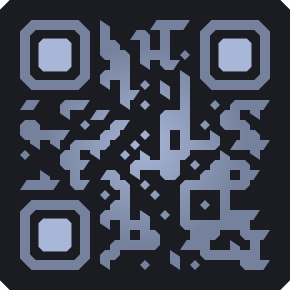
Create QR codes with a unique appearance and excellent marketing potential using the Visual QR Code Designer application. Pre-installed templates, color palettes, and hundreds of fine-tunable graphic elements make it easy to design and create customized QR codes. The software features enable efficient batch processing of large volumes of user data. High-quality raster image and vector output files.
Software implementation of custom-designed QR codes
Features and application areas offered by the QR code design application
The purpose of developing the software was to enable anyone to easily and quickly design and create custom-designed QR codes using a specially developed set of tools. These codes can be found almost anywhere, such as on websites, in press publications, advertisements, posters, restaurant menus, brochures, product packaging and other advertising media. Most mobile phones and other mobile devices have built-in hardware and software support for scanning QR codes, so these capabilities are practically always and everywhere available.
Advertising professionals recognized the potential of this constantly available scanning capability at an early stage. Thanks to hardware development engineers, who enabled these high-resolution optics through technological advances to scan QR codes with appearances differing from the standard and decode their data content within seconds without problems on mobile devices. Due to the widespread availability of these devices and the maturity of the technology, this represents enormous advertising potential for businesses, products and companies that actively use QR codes with distinctive visual appearances.
Graphic designers, web developers and marketing professionals are constantly looking for new and effective solutions in this area, and the Visual QR Code Designer application provides a suitable answer, operating independently on the Windows operating system. The program is capable of creating both traditional QR codes and QR codes characterized by a distinctive visual appearance. Taking product manufacturing and industrial requirements into account, the software can also support the batch conversion of large amounts of data into QR codes. This means that the software can process successive elements of data sequences within a single session, which can greatly simplify the fast and efficient processing of large data sequences with identical graphic properties but different information content.
Information-carrying QR codes
The QR code (Quick Response Code), initially developed and standardized as a two-dimensional code designation and technology, was introduced by Denso Wave in the mid-1990s, originally to streamline the manufacturing processes and automation of Japanese industry. However, since the industrial introduction of QR codes, with the rapid spread of the internet, mobile phones and other smart mobile devices, as well as their extremely wide range of applications, we encounter these distinctively designed QR codes almost every day in a wide variety of locations and on surfaces - flyers, media, product packaging, various informational materials, websites, public administration, hotel information desks, theatre programmes, schools, healthcare institutions, railway stations, airports, menus, NFC payments, coupon codes, advertisements or even a cinema poster.

Graphic design companies, web developers, designers, engineers or advertising agencies involved in creating conventional or specially designed QR codes and encoding large volumes of data are also responsible for developing the visual style concept of QR codes - the Visual QR Code Designer application can provide specialized software support.
Interactive QR code designer
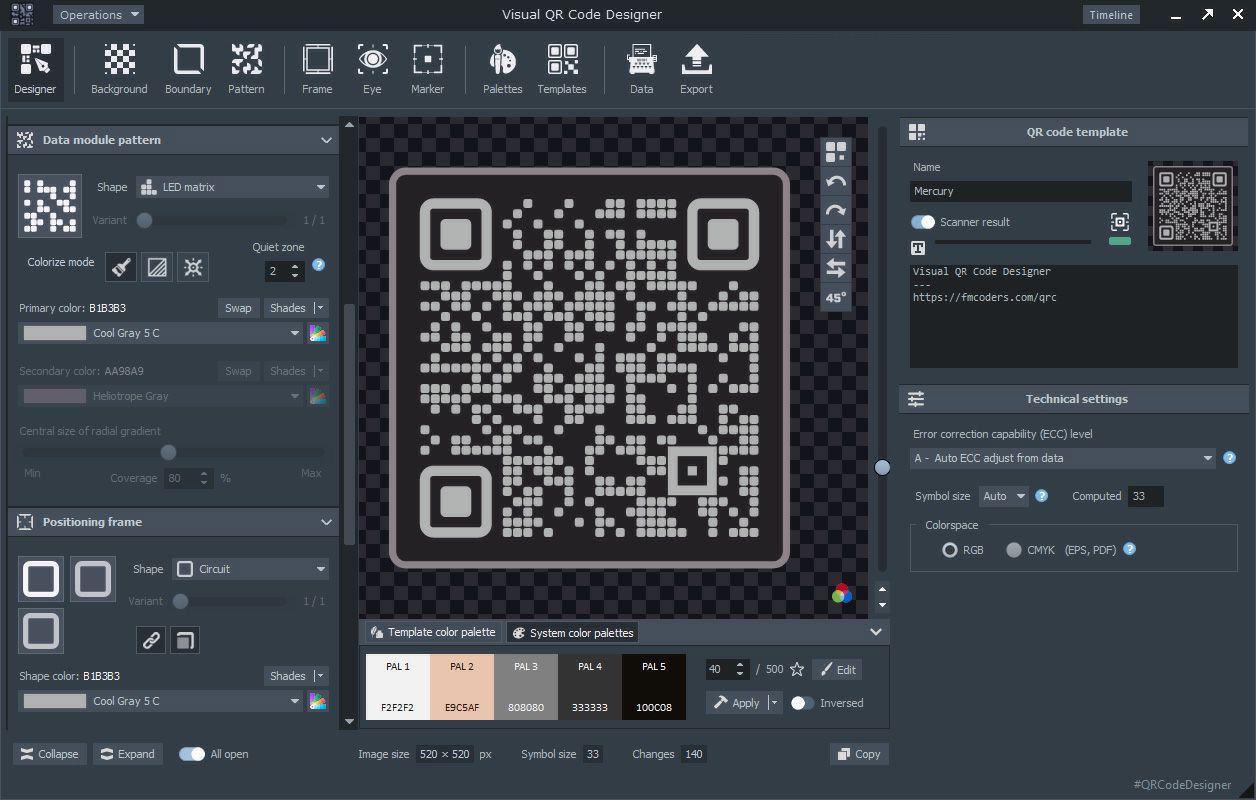
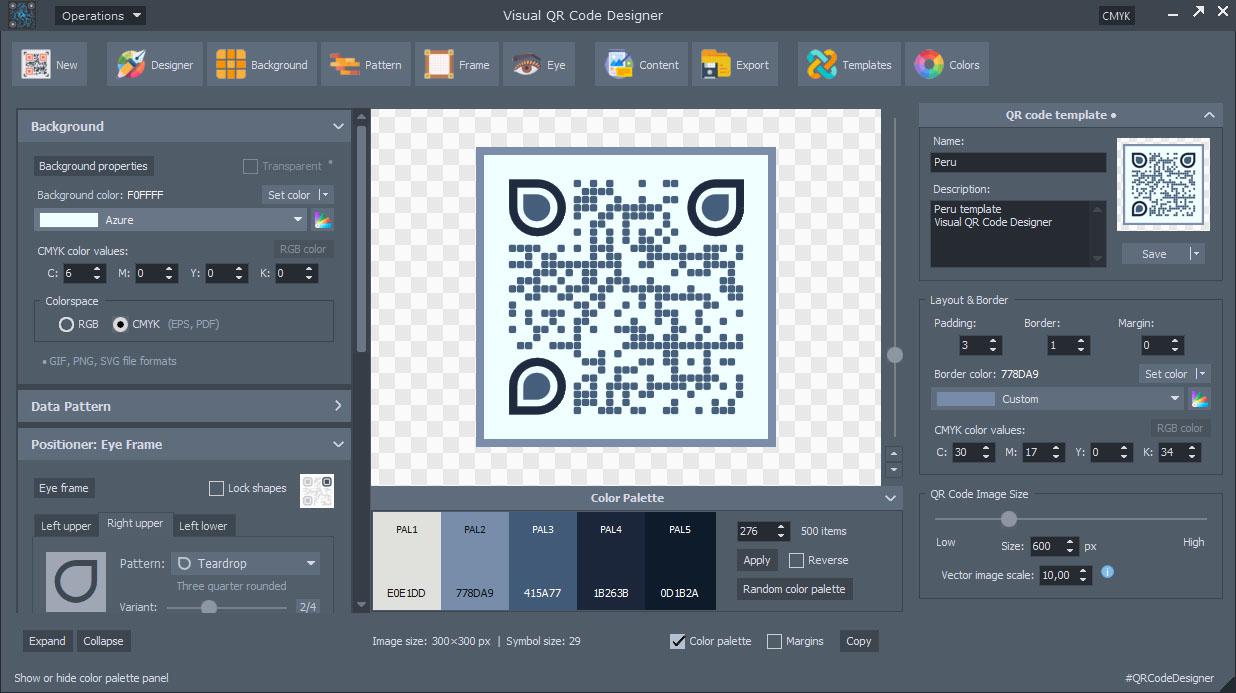
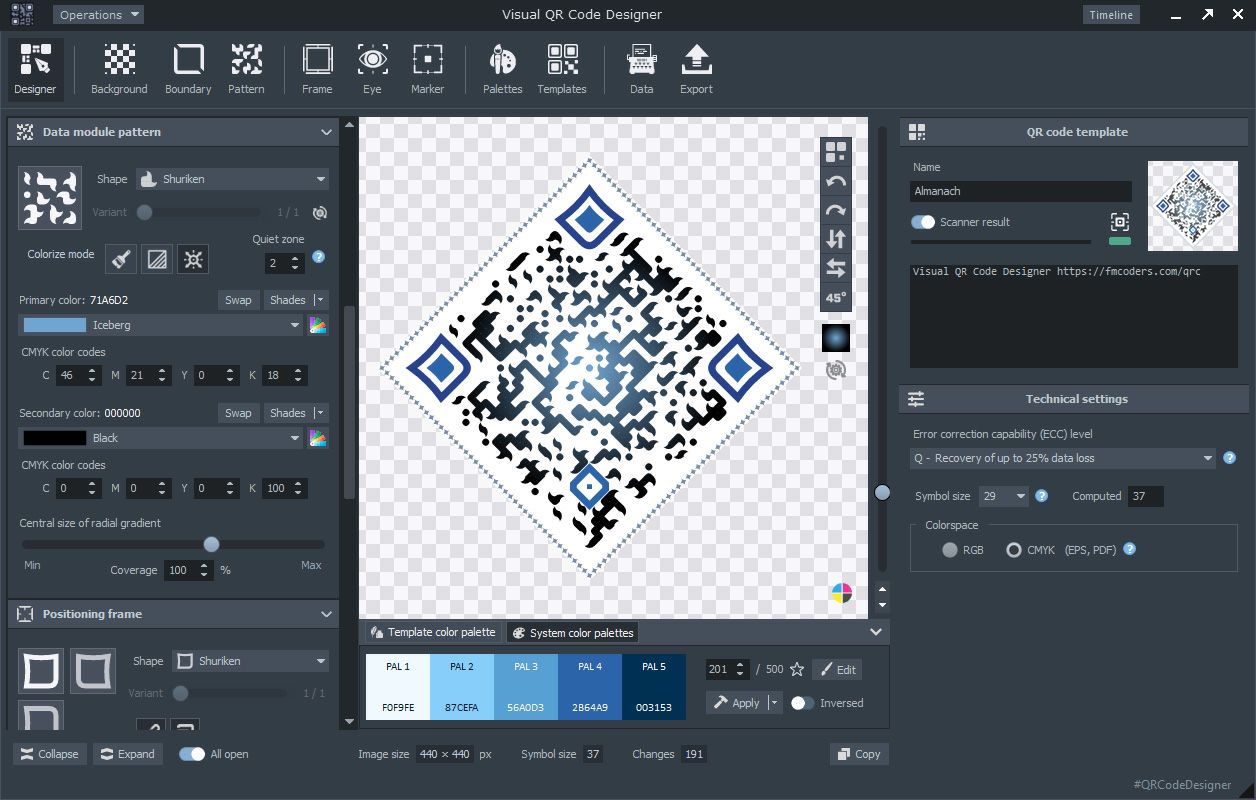
To create QR codes, the software provides a modular system of blocks located on the designer panel interface, which can be used to configure the visual properties of the appropriate structural elements of QR codes. In the center of the designer screen, the QR code being edited in real time is displayed. Alongside the application's Timeline feature, the background-running QR code scanner, which also functions as an indicator, makes editing changes even more efficient, while the changes made are immediately applied to the program interface. The result of the design process can also be enhanced by transformations of the template shape (rotation, mirroring), giving QR codes an unconventional visual appearance. Within each module, the patterns, colors, rotation angle, visibility, gradients and shades of the individual building blocks of the displayed shapes can be adjusted individually. The designer screen also includes a section for technical settings related to the code, where the symbol size, ECC level (Error Correction Capability), and RGB or CMYK output color space can be specified.
Color palettes for a custom appearance
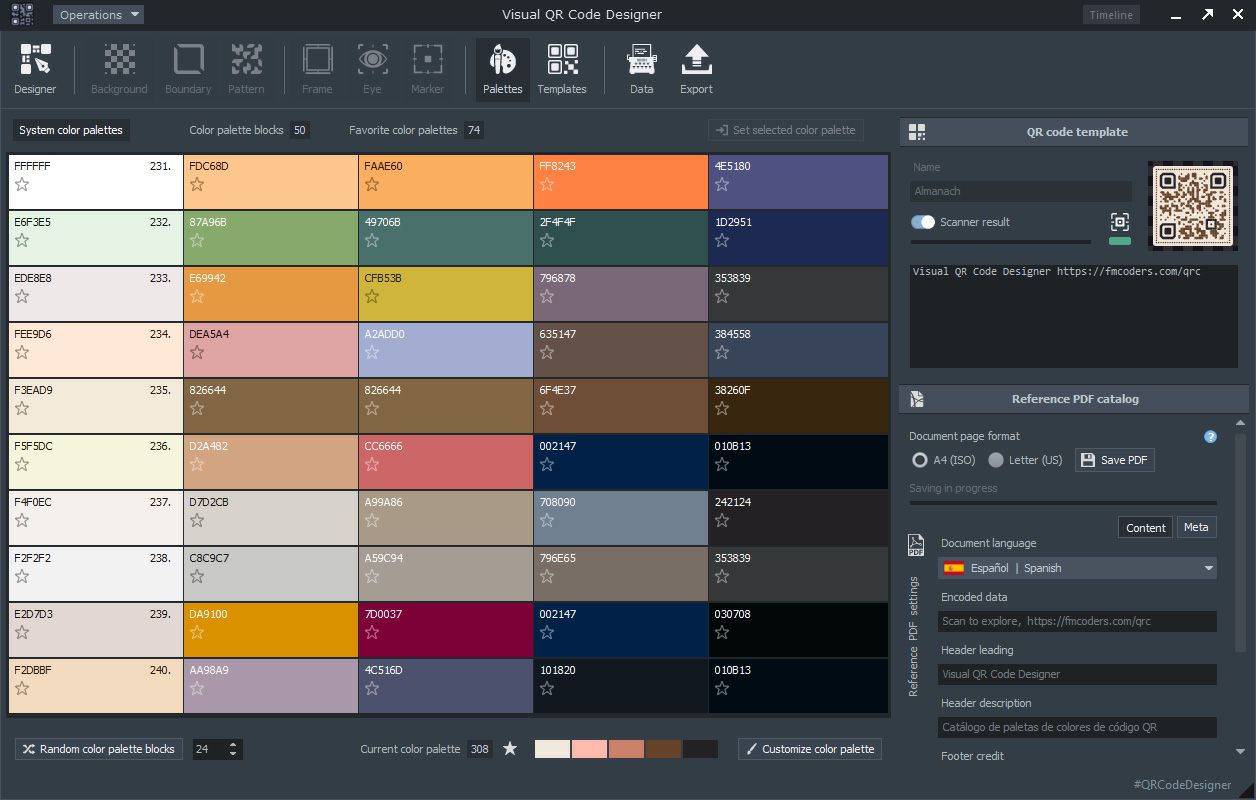
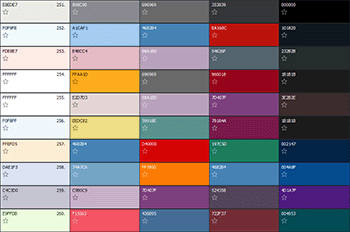
Depending on the intended use and visual environment, the color scheme of the QR code can be selected from five hundred different fully editable color palettes. In addition to the default black data area on a white background, the appearance of the edited QR code can be changed at any time using the predefined color palettes provided by the software. Each color palette consists of a five-color group, and the palette blocks are displayed in descending order of brightness in the palette view. The color palette selected with a single click can be customized using the palette editor, while a double click applies its colors to the QR code template as the current palette. The fields at the bottom of the screen allow the ten-item palette blocks to be navigated manually, or the random generator button can be used to jump to another block. Color palette items can be marked by clicking any star icon, adding the selected palette item to the favorites. With a single button press in the editing field, the color palette can be reordered in reverse according to color brightness, allowing the light or dark theme of the template to be easily converted into its opposite.
Ready-to-use QR code templates
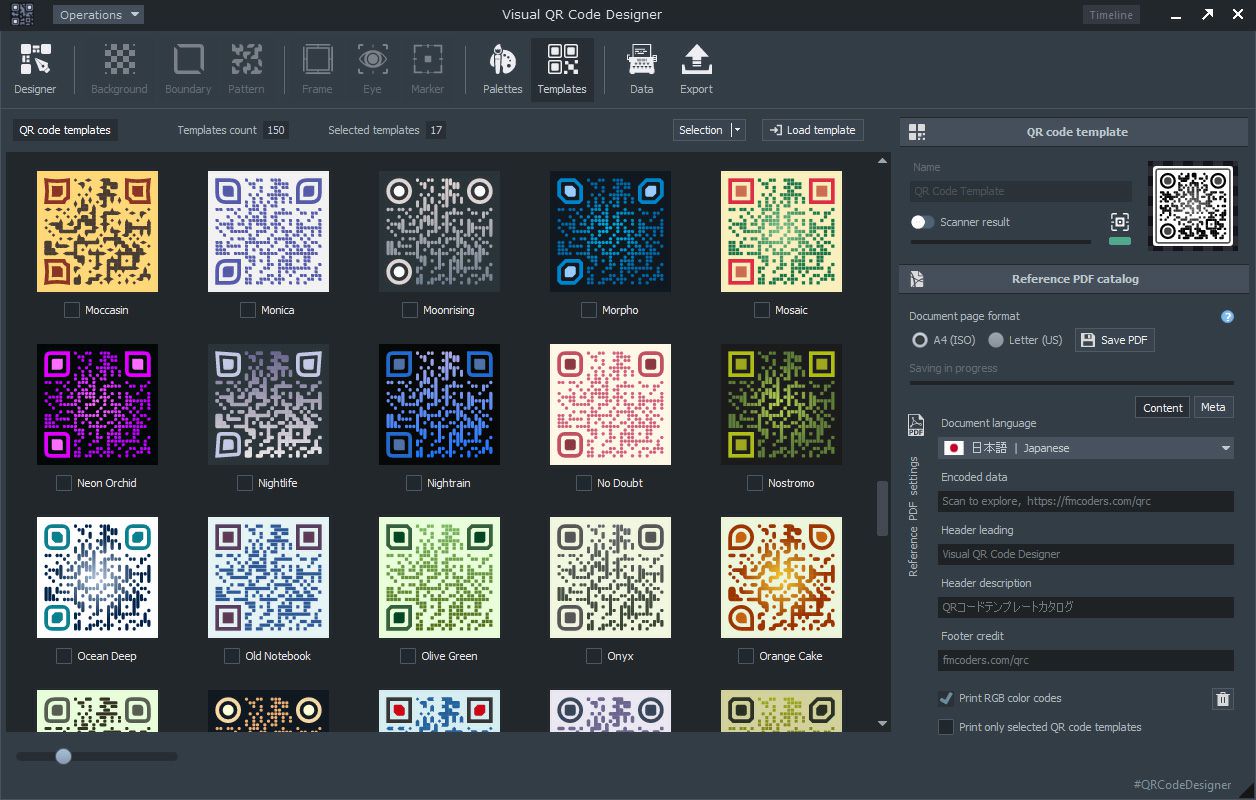
The software provides one hundred and fifty immediately available, pre-built QR code templates with light and dark base themes, ready for use. A wide variety of built-in QR code template designs, based on different themes and the intended application area, location or functionality, are available in a scrollable template selection panel. Dozens of QR code templates, sorted alphabetically by name, are available in the preview area, allowing various convenient basic operations to be performed (selection, saving, loading). The selected template elements are separately tracked by the program, which will later be relevant when creating reference catalog document files. Due to their vector rendering mode, the templates are always displayed at the best available resolution and quality, while their general preview size can be freely adjusted using a slider. The built-in QR code templates, which can also be selected by double-clicking, can be transferred to the designer panel, where editing and visual customization of their modules can begin based on the default template appearance.
Data types by application
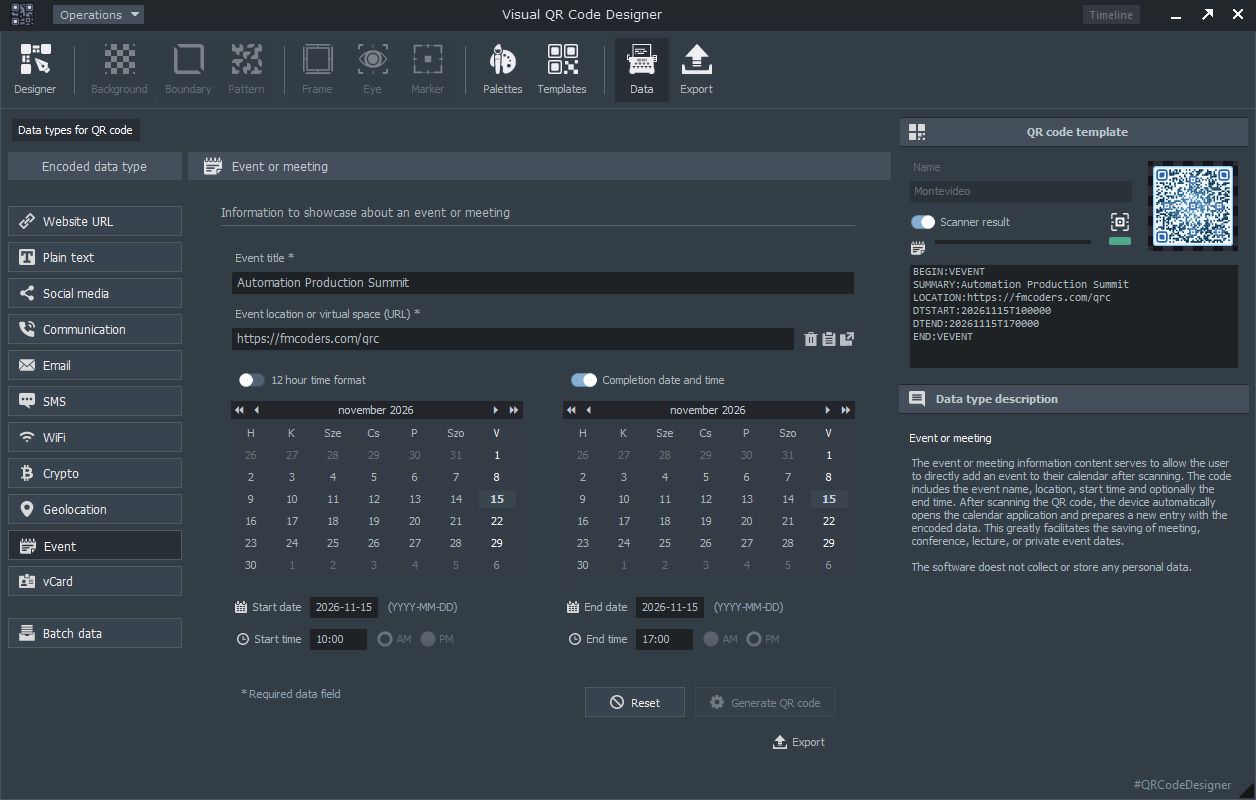
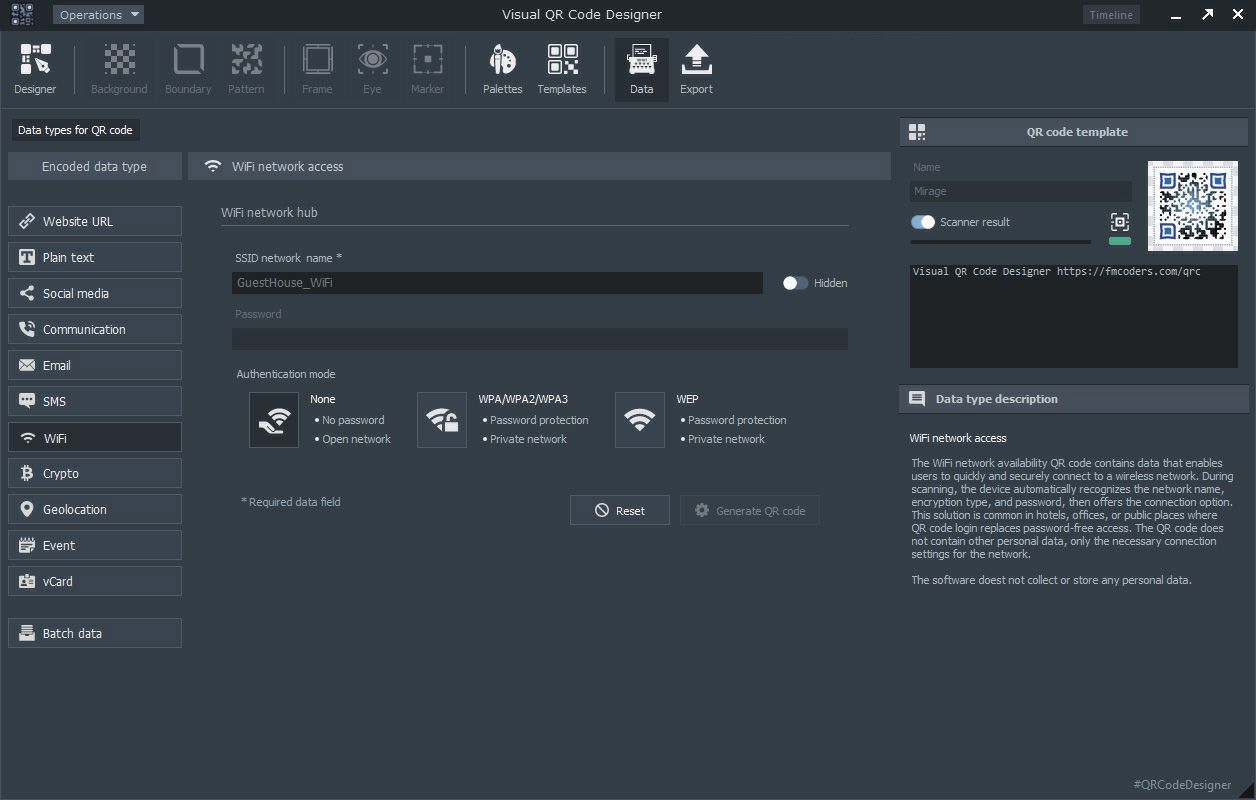
In addition to designing QR codes with unconventional and special appearances, the application also provides the ability to generate specific data as QR codes created for defined application purposes. This is one of the fundamental parts of the software's QR code generation functions. The structural composition of the data types to be encoded differs because different information needs to be encoded in each case. By clicking the button corresponding to the selected type, specialized forms for configuring and entering the parameters of the data structure are displayed on the screen. Selecting the specialized types also determines the applicable area, which may include a website URL, plain text, social media sharing, communication applications, email sending, SMS sent to a phone number, access to a published WiFi hub, cryptocurrency transactions, geolocation-based map coordinates, calendar designation of an event or meeting, or vCard electronic business data content generated as QR codes. The data descriptions and explanatory texts in the application's sidebar help users understand the application area and appropriate interpretation of each available data type.
Batch processing of data records into QR code format
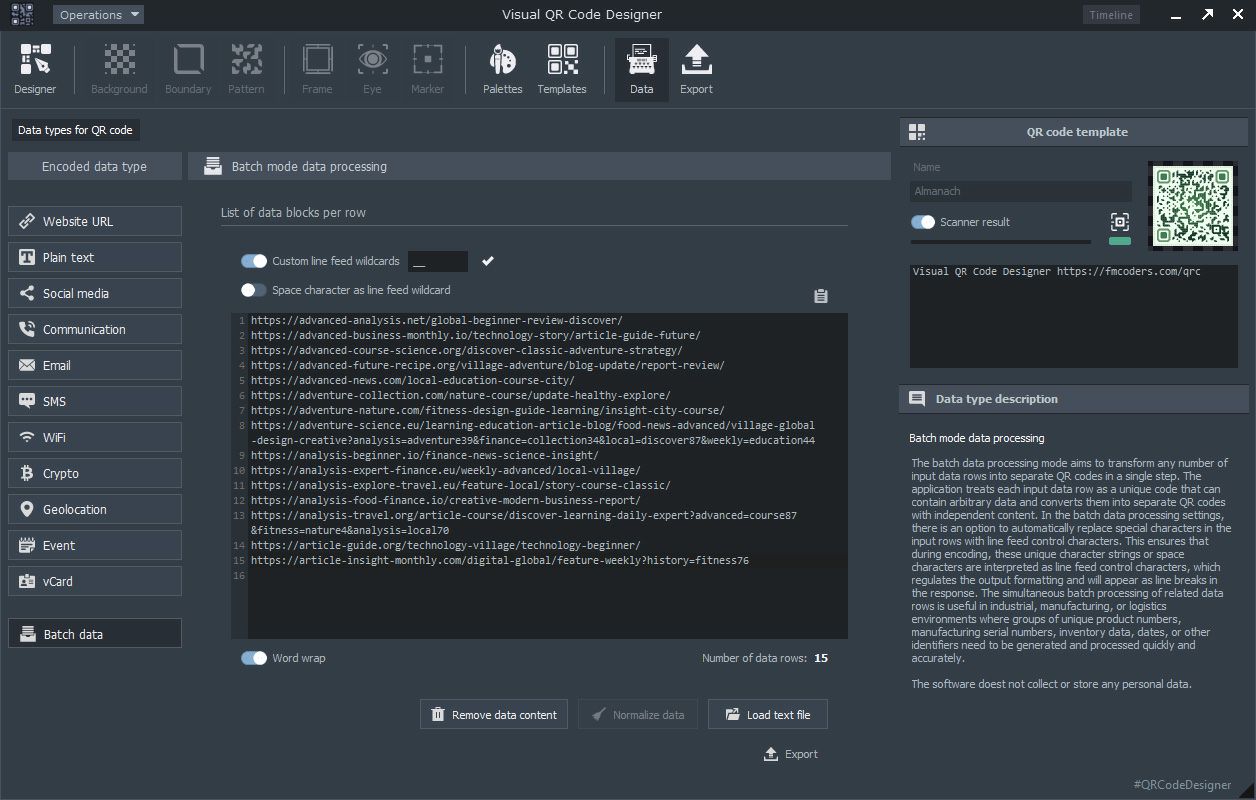
Mass conversion of general user and other data into QR codes may be required in application areas where the large-scale appearance of QR codes is essential to the operation of a given process (product manufacturing, commerce, logistics). The software's batch QR code generation function makes it possible to convert large amounts of data into QR codes with the same visual appearance within a single session in one step. The batch input source is an easy-to-use text editor capable of handling arbitrary data. By editing the batch data input text field line by line or importing an external text-based data file, the data records can later be exported with the style corresponding to the individually designed QR code template. The editor interface also allows a line-break character sequence to be defined for interpreting individual lines, which can split a single input data record into multiple lines based on virtual line-break characters. The text content of the resulting QR code will therefore appear as actual line breaks after scanning.
Output file format export
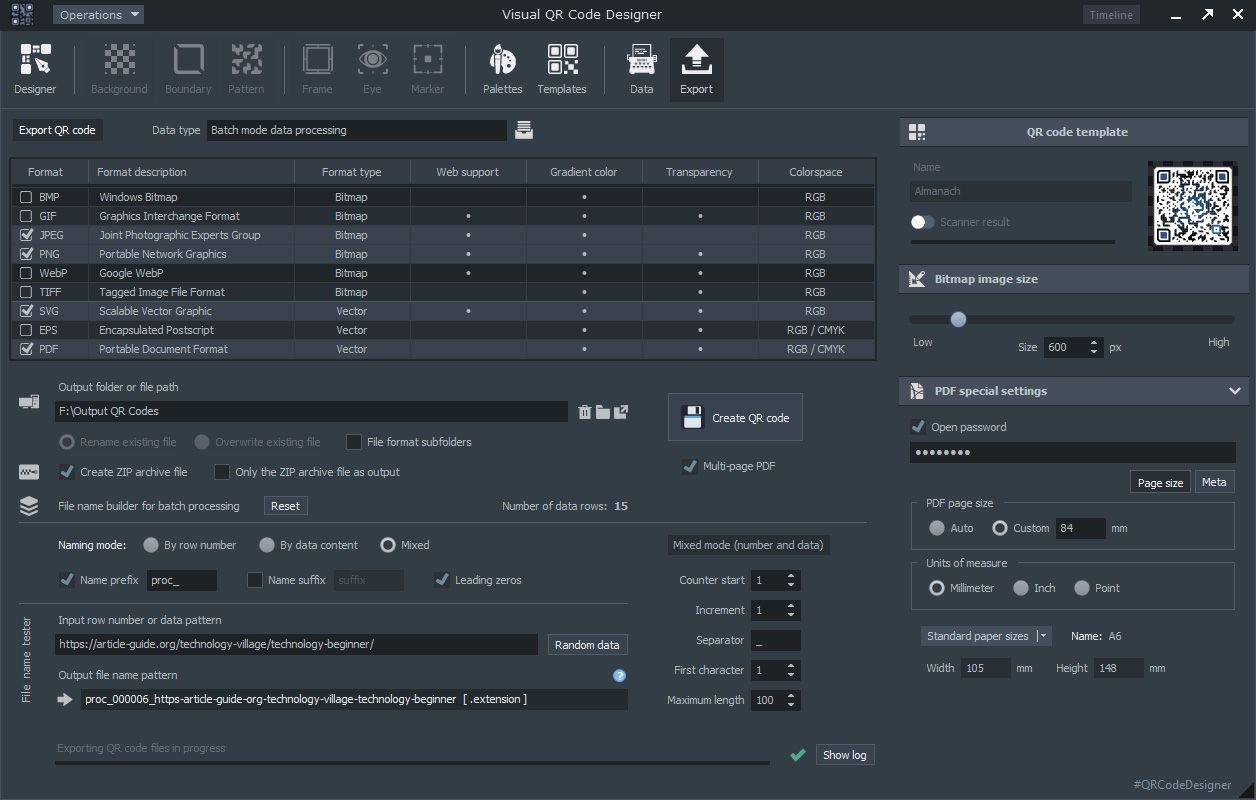
The QR code export screen contains a tabular overview of the supported output file formats, along with some of their characteristic properties. The application's operating mode changes when switching between types that work with simple data structures (URL, SMS, WiFi, geolocation data, vCard, etc.) and batch data processing modes. The available output formats are enabled according to the software license. The general export function allows multiple file formats to be selected simultaneously as required; the software can optionally write files containing QR codes into subfolders according to their format, and an additional ZIP compressed file can also be created from the files to be exported. When generating QR codes in batch mode, the export panel provides output file name settings (file name tester), ensuring consistent file naming during batch QR code export according to the requirements. The PDF file format export settings are supplemented by a PDF configuration module activated in the sidebar due to the format's specific properties (optional password, multi-page document, configurable page size).
QR code reference catalog
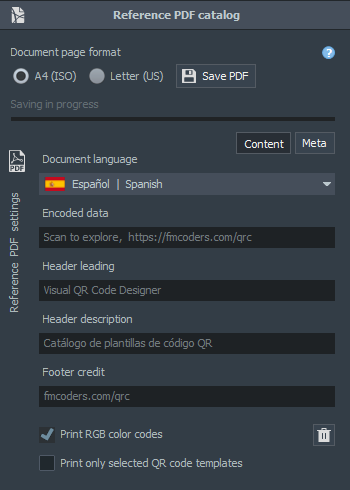
One useful feature available for ready-to-use template designs and color palettes is the QR code reference catalog, which supports dozens of national languages at the document text content level. Several controls required to create the document file are located in the module panel on the right side of the screen. The catalog itself is a PDF file that allows a creative graphic design company to produce, with a single click, an album-style presentation of its portfolio of reference works consisting of QR codes created with the Visual QR Code Designer application for its clients. The catalog consists of selected QR code templates, additional graphic elements or a collection of selected color palettes. The catalog serves to present a numbered collection of QR codes corresponding to the current template and its styles, from which the client can select the appropriate starting base design for the concept of their custom QR code.
Visual design steps for creating QR codes
Creative design and creation process operations
Professional QR code design
When designing QR codes with a distinctive visual appearance, the primary task is to consider and determine the intended application area and usage conditions of the code. A minimalist approach should preferably be followed, as appropriate style selection and design can achieve excellent marketing results.
Customization of structural modules
Once the primary visual appearance has been established, the style of the QR code's building elements should be aligned with the conceptual design. The key lies in the details, so only small changes should be made when configuring the modules. The software's timeline feature provides insight into previously performed modifications.
Exporting output formats
After visually creating the template, the encoded data type can be selected and the form fields can be completed based on the information to be encoded. The resulting QR code, with its custom style and precise data content, can then be exported to the appropriate output file format using the controls of an interactive and easy-to-use configuration panel.
The QR code is a patent and registered trademark of the Japanese company Denso Wave, and is also referred to as a two-dimensional code. There are many different types of two-dimensional codes, and the QR code standard belongs to the family of two-dimensional codes and is, not coincidentally, the most widespread and popular format among these visual coding systems. With the spread of information technology, the internet and mobile phones, QR codes subsequently appeared in both the physical and virtual spaces after their industrial use. Advertising professionals, web developers, product manufacturers, industry and business users quickly discovered the potential of this innovative and highly versatile opportunity. After the widespread familiarity of traditionally designed QR codes, QR codes with a distinctive visual appearance also began to spread, retaining their information-carrying capability while offering significant marketing advantages. Scientific studies in this field confirm the significant benefits of QR codes with distinctive visual appearances in sales and advertising markets. Codes with traditional visual characteristics naturally remain available, and their originally intended innovative value and subsequent practical implementation have not changed.
QR codes with a visual appearance that differs from the usual standard always stand out from their conventionally designed counterparts (dark structural and data elements on a light background). They feature different color schemes, shapes and additional graphic motifs and are collectively referred to as QR codes with a distinctive visual appearance. Codes with specialized visual appearances quickly attracted the attention of the marketing sector as stylish advertising graphic elements with the potential to attract prospective customers. In the past, the visual design and creation of these custom-looking codes presented considerable difficulties, primarily for technical reasons, as no specialized QR code design and generation software existed. However, the objectives of developing Visual QR Code Designer also included making both the design and code generation processes significantly simpler, faster, more cost-effective and more efficient.
Due to vector graphics-based code generation, visual image rendering and writing to file formats are very fast. Another advantage of vector-based QR code generation is that the image can be enlarged without limitation and without any loss of quality, while bitmap image formats are created in the appropriate file format following an intelligent vector➟bitmap conversion process. The program also provides additional useful features for batch operations on large volumes of data. Simple source data input is supported by batch export solutions (primarily based on file naming conventions) and specialized configuration modules for PDF output formats.
In addition to ensuring data privacy and providing user interface support in dozens of national languages, the application offers support for graphic designers, businesses involved in visual design, web developers and professionals working in other creative fields. The integration of the versatile reference catalog module provides these businesses with an immediate solution for presenting their graphic portfolio related to QR code design in a visually clear way. The reference catalog module can export even several hundred QR code samples with different styles in PDF format, allowing the customer to choose according to their requirements and preferences.
Create custom QR codes on Windows PC
Lightning-fast installation
Quickly and securely download the Visual QR Code Designer application from the website and start designing your QR codes immediately after installation, or process large volumes of data into QR codes in batch mode.
Custom QR code creation
Design and create QR codes with a distinctive or traditional appearance using the software. Process large volumes of data and generate QR codes in a single operation. High-quality raster or vector output file formats.
QR code production with software support
The primary objective in developing the Visual QR Code Designer software for Windows was to provide specialised and efficient software support for businesses involved in QR code design, the creation of distinctive graphic concepts or the conversion of large volumes of data into QR codes. The application's structure and available features are designed to significantly facilitate custom QR code design and batch data processing.
Vector graphics-based template design
Vector graphics are a form of digital imaging built from points, lines, curves and geometric shapes defined by mathematical functions, allowing the image to be enlarged or reduced to any size without loss of quality. The structure of QR codes and the way their components are constructed make vector graphics an ideal basis for creating the code image. The software therefore constructs the image from vector graphic building blocks, an important feature of which is the use of the so-called overlapping drawing technique when rendering the primitives of the graphic (squares, circles, ellipses and other closed curves). This means that the outlining and filling of directly adjacent primitives is extended over the area of the neighbouring primitive. The resulting vector graphics drawing technique therefore ensures that the final image contains no visibly distracting background elements, providing complete coverage of the required areas. Drawing is very fast because the application generates the graphic primitives sequentially, providing efficient processing performance, particularly during batch data processing. Vector graphic QR code templates currently being edited can be accessed at any time from the design panel.
Scanner algorithm running as a background process
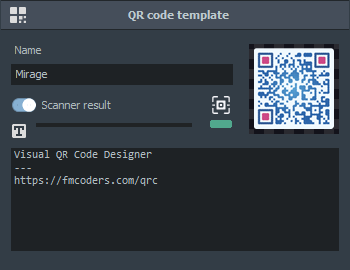
Custom-designed QR codes generally differ from the traditional appearance of black squares on a white background. In general, scanning with an optical scanning unit is more likely to be successful when the recognised image is sharp, clear and high-contrast. Since the final appearance can be created using a wide range of colours and shapes, Visual QR Code Designer provides system-level support for evaluating QR code readability. The built-in scanner continuously monitors user modifications to the template image. Using a visual indicator in the upper-right corner of the screen, the scanner displays the readability characteristics of the currently displayed QR code using colours and the text content of the decoded data. The scanning software module provides informational feedback on readability and operates unobtrusively in the background. This feature can be enabled or disabled at any time.
Business efficiency of distinctive QR codes
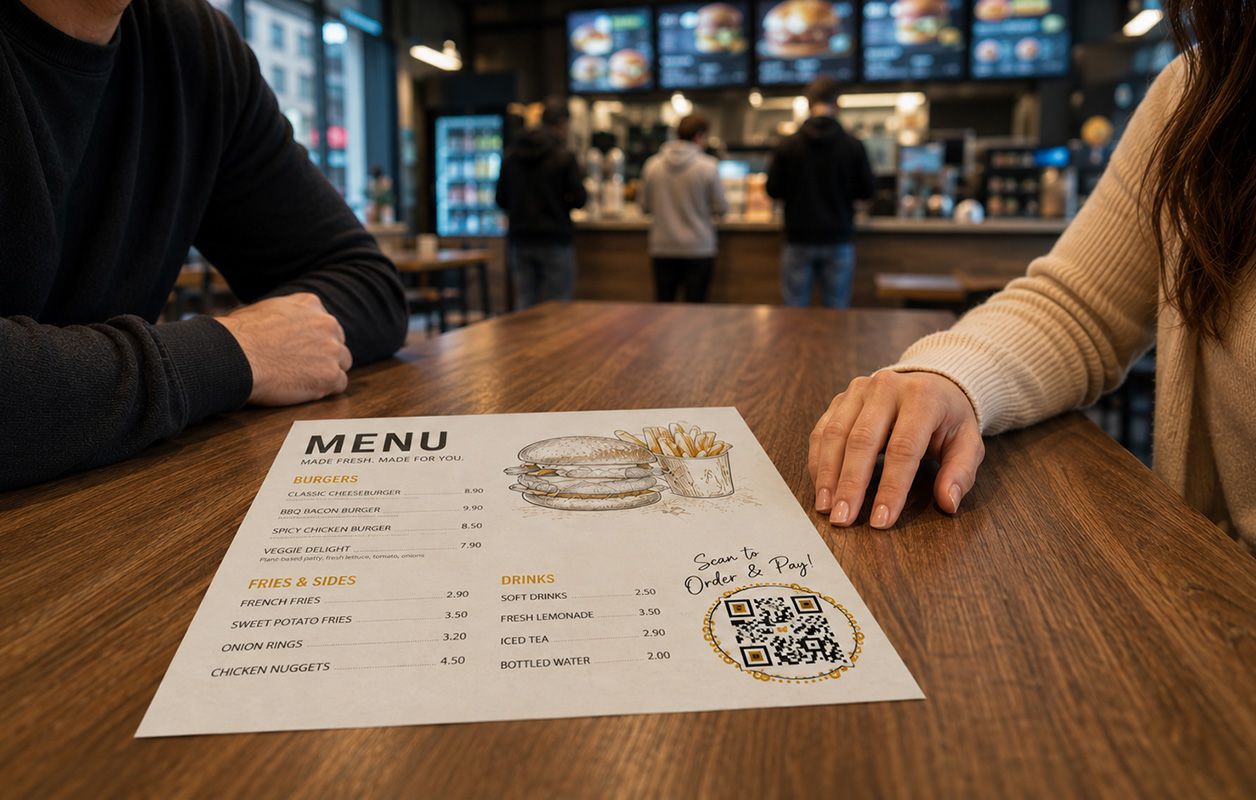
A QR code symbol can now be much more valuable than the familiar black-and-white graphic. With suitable software, its appearance can be creatively customised, allowing its colours, shapes and visual elements to harmoniously match a brand's identity — whether used on a business card, packaging, poster or an online campaign. A QR code designed specifically for marketing purposes can therefore be more than a technical element simply added to a design; it can also become an integral and attention-grabbing part of the communication.
A distinctive appearance can naturally arouse curiosity in the observer. When a QR code fits appropriately into its surroundings, it is more likely to attract interest and encourage the code to be scanned. A well-designed QR code can serve practical purposes while also strengthening a brand's visual presence.
Download the custom QR code generation software
After downloading and quickly installing the application, you can immediately start designing your QR codes with a custom appearance based on your own ideas. Real data can be used to create QR codes based on templates designed and created in the design interface with Visual QR Code Designer, and the completed QR codes can be saved in bitmap and vector formats by setting just a few parameters. Businesses involved in graphic design can create reference catalogues to showcase QR codes with an excellent visual presentation, while the batch QR code generation function is also available for processing large volumes of data.

Module units in the design panel
The software's design modules are essentially divided into two groups: one group is related to general settings, editing and other auxiliary functions, while the other consists of module elements that affect the appearance of the QR code. These smaller units are located in the program's design panel, each defining clearly separated functions. The framework-related elements include modules such as the QR code scanner, color palette editor, design timeline and technical settings. Directly related to the appearance are the modules defining the structural composition of the QR code, such as shape transformations, background, boundary pattern, data module pattern, positioning frame, positioning eye, and alignment marker modules that technically assist shape recognition.
Timeline function
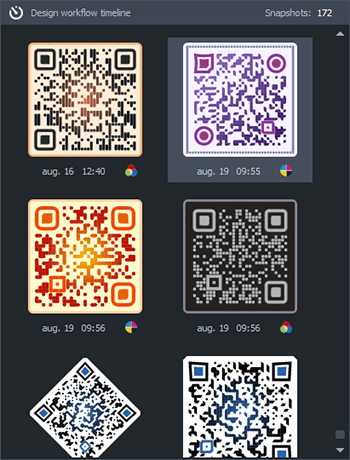
The software's design timeline function extends the traditional editing operations Edit menu ➟ Undo/Redo to a higher level. During the design process, a significant number of modification, setting and fine-tuning operations may be required, where being able to track changes over time and see them visually provides an advantage. The timeline function of the editing process provides this capability. Its panel can be accessed using the dedicated button in the upper-right corner of the screen title bar or through the View ➟ Design Timeline (CTRL+T) menu item available from the program's main menu. The panel displays characteristic previous design states with timestamps, arranged chronologically, allowing any previous editing state to be selected. The familiar Undo/Redo editing operations remain available through the menu or keyboard shortcuts.
Shape transformations
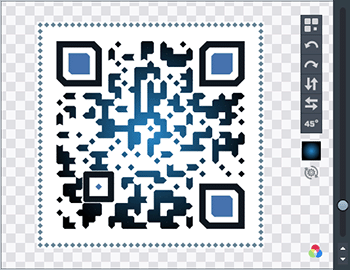
Optional geometric shape transformations can be used to achieve highly striking visual effects in custom-designed QR codes, which can still be reliably recognized and decoded by scanning optics and algorithms. General shape transformations are based on mathematical matrix transformation functions, which can effectively produce the final appearance in ways that differ from conventional methods. By using shape transformations, the software can create attention-grabbing QR codes that offer significant marketing advantages over codes created without conventional transformation methods. The transformations supported by the application include 90-degree rotations, horizontal and vertical reflections, as well as a special 45-degree rotation within the geometric plane of the drawing. Transformation operations do not affect QR code readability and can also be freely combined. The transformation functions are available at any time from the software's main menu or by using the shape transformation buttons on the design panel's display area.
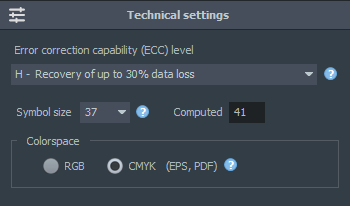
Technical settings
The technical settings group is located on the right side of the design panel, where three characteristic properties can be controlled. ECC - Error Correction Capability is used to recover potentially damaged or missing parts of the QR code through redundant data encoding ➟ Auto, Low: 7%, Medium: 15%, Quality: 25%, High: 30% (the percentage value expresses the ratio of the theoretical maximum error correction capability).
The symbol size determines the physical size of the QR code using square dimensions, e.g. 29×29, 45×45, which consist of basic symbols (small light and dark areas). Depending on the data content, the software may override this user setting.
Graphics using the RGB (Red, Green, Blue) color space are generally intended for display on digital screens (default). The CMYK (Cyan, Magenta, Yellow, Black) color space is a standardized and commonly used color model in the printing industry. The CMYK color space is supported by the EPS and PDF output file formats.
General QR code structural modules
With structural modules that affect the appearance, the visual properties and characteristics of the respective module can be precisely configured, with changes immediately visible in the large image on the design panel. Clicking the selector element on the left side of the modules or the shape drop-down menu opens the pattern selection panel belonging to the QR code structural module. Each module generally includes a drop-down color selector and a local context menu for shades. Colors can be selected from a list identified by names or by color groups, comprising more than 1,200 selected colors. The local color settings window allows precise values to be entered, including HSB (Hue, Saturation, Brightness) or RGB hexadecimal values. From the locally available shades menu, shades from the color set used by the template can also be selected, preserving the consistency of the template's appearance and producing a harmonious color scheme across the entire image.

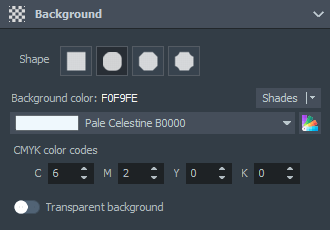
Background shape module
The easiest-to-use module allows the properties of the template background to be configured. In addition to the background color, special enclosing background shapes can also be specified, making the appearance of the final graphic more expressive and further emphasizing the uniqueness of the QR code when placed in a suitably prepared environment or surface. In addition to the traditional square background, curved, sharply angled and negatively rounded corner shapes are also available. With an optional switch, the background color can be made transparent, in which case no background color is defined. This can be useful when the exact environment or display surface where the design will later be used is not known. When the background is transparent, both the software and the scanner algorithm assume a white background, but it is not drawn during the design process. When exporting QR codes with a transparent background, care must be taken to choose file formats that support transparency.

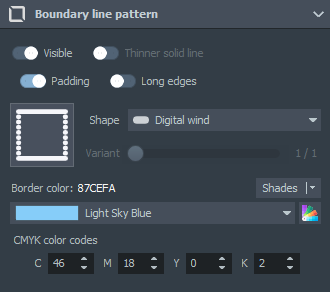
Boundary line pattern
The boundary pattern is an optional element used to configure a line or pattern directly surrounding the image. It can help the central graphic stand out more clearly from the background when the surrounding environment is otherwise visually noisy or cluttered. The structural module for the boundary line pattern can be activated using the visibility switch, after which both the pattern and the one-unit-wide clear background area outside it can be configured. A dozen or more patterns can be selected from the module selection interface, generally matching the chosen pattern of the main image. The default line thickness corresponds to the width of one QR code module, while some continuous line types also allow a thinner line width to be specified. For semi-dashed patterns (Digital Wind, Rainy day), an optional long closing line can be selected, which draws a continuous line in place of the original short segments while retaining the selected style.

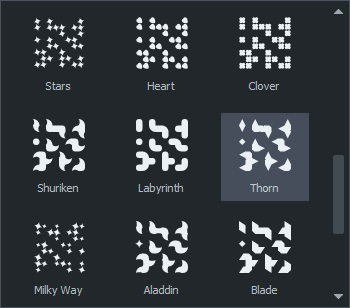
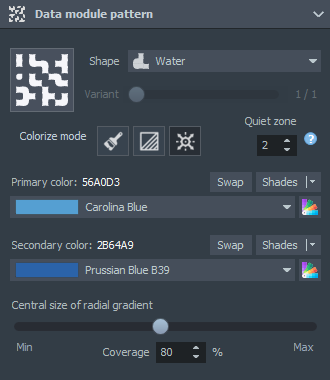
Data module pattern
The overall appearance of QR codes is primarily determined by the pattern of the data area and the appropriate selection of positioning elements. By coordinating the data module style, the quiet zone directly surrounding the QR code, and the coloring method, QR codes with visually valuable appearances can be created from a marketing perspective. More than thirty data module patterns with different styles available in the software can be freely combined with other modular elements and used together with coloring methods that produce visually striking results.
In addition to the simple coloring mode, a radial and a linear gradient model are also available. When using gradient modes, two different colors must be specified. Predefined colors identified by name, as well as the color palette and its shades, provide assistance with this. Gradient settings include a control for adjusting the gradient projection angle and the coverage of the central color.

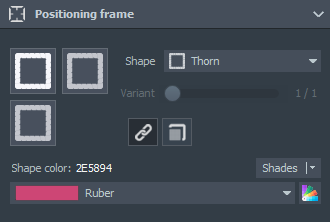
Positioning frame
The three distinctive positioning module elements (Finder Detection Pattern) enable optics and scanners that recognize QR codes to precisely determine the position, size and orientation of the codes, even in tilted or distorted images. They are characterized by an outer framed section consisting of 7×7 modules, located in the three corners of the image. This asymmetric arrangement enables the orientation of the code to be determined unambiguously. Their size is always fixed, regardless of the QR code's data content or version. By default, the patterns of the positioning frames are identical to those of the positioning eyes (the same patterns). However, by releasing the lock button, they can be unlocked and different pattern types can be selected independently for each one. The frame colors are always identical, because using too many colors in the image can interfere with or make uncertain the precise operation of recognition optics, and can also have a negative effect on the final appearance.

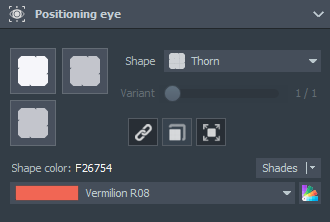
Positioning eye
The other component of the positioning module is the inner graphic, separate from the frame, called the positioning eye. The eye and the outer frame work together to provide the orientation-assisting function of the positioning elements. This enclosed positioning element, located within the frame and consisting of 3×3 modules, can have a different shape and color from the frame. It is separated from the outer frame by a one-unit-wide empty area on all sides, allowing the shape and color of the inner eye to be customized. It is generally advisable to choose the same pattern for the eye as for the frame (Circle➟Circle), but different patterns are also permitted. The positioning eyes can optionally be locked together in the same way as the frames, in which case they receive identical patterns, although for certain shapes the appearance may change to match the respective corner (reflection). One of the controls available for the module also allows a slightly larger shape to be configured for the eyes, which can provide the image with a more pronounced appearance and a distinctive effect.

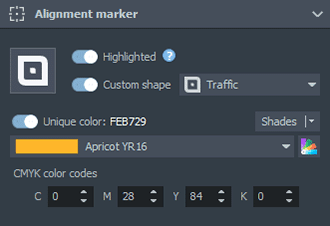
Alignment marker
The alignment marker pattern is responsible for precise module grid recovery in larger-data or higher-version QR codes when images are potentially distorted. It consists of a frame made up of 5×5 modules and a central element. Thus, a 3×3 empty (unmarked) ring surrounds the central element. The larger positioning elements determine the location and orientation of the code, but they cannot handle perspective distortion, so the alignment pattern is responsible for correcting this geometric deviation. Unlike positioning elements, they are not located in the corners but inside the code, arranged in a regular grid according to the order defined by the standard, and depending on the version number, multiple alignment markers may appear within a single code. By default, their appearance follows the data module pattern, but the software also allows a custom pattern different from the data module pattern to be specified, as well as a completely independent color.

Applying color schemes to templates
The color settings of individually customized QR codes are among the most important design tasks. The program provides hundreds of carefully selected color palettes to help create templates with the appropriate color scheme and appearance. Each color palette consists of five colors arranged by brightness, grouped into blocks of ten. The palette panel contains controls for managing palettes, such as customizing palette colors, applying a palette to the template, the palette block stepper, and a random palette block. Clicking a palette selects the desired color group for application to the QR code template, and the palette can also be pinned to favorites. The colors assigned to each palette have been selected to provide an appropriate level of contrast and visual color effect when applied to the template.
The palettes are numbered for precise identification later, and hexadecimal RGB color codes are also provided. The brightness-based ordering is important because the color's index within the palette determines which template element the color will be assigned to when the palette is applied to the QR code template. After assignment to the template, the selected color can be changed, and the shades can also be fine-tuned, which the software natively supports from the quick menu of the given module.
For QR codes with a customized appearance, the contrast (difference in brightness values) between the background color and other structural elements visible for data or positioning purposes is essential. The original combination of black and white has the highest (infinite) contrast value, so when selecting non-standard colors, you should always aim to achieve the highest possible contrast ratio.
Customizing a color palette
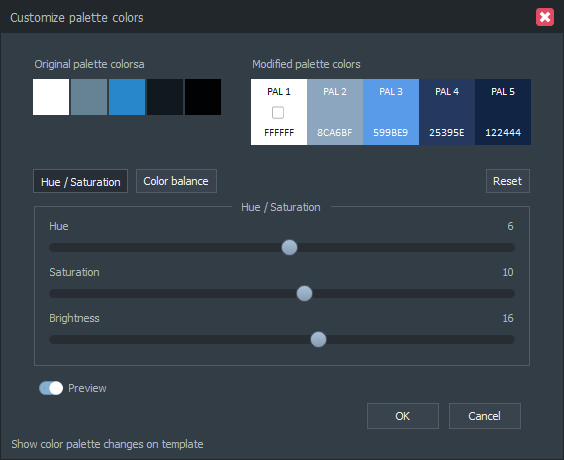
The palette editor window provides uniform settings for the elements of a five-color palette. It is available on the design panel, directly below the QR code image, or can also be opened from the main menu. It allows the elements of the current template or one of the selected color palettes to be adjusted as a group. The palette colors' hue, saturation, and color balance can be fine-tuned using controls familiar from image editing software and easy to adjust. The preview switch allows immediate changes to be tracked in the template image displayed in the background and currently being edited. Before opening the palette editor window, the palette can be set to be sorted by reverse brightness, which can produce special visual effects in terms of appearance (inverted image with a dark background).
Only the RGB (Red, Green, Blue) color channel parameters can be adjusted in the color balance panel; the four-component CMYK output color space codes previously specified in the designer are not available here. In this case, RGB➟CMYK color space conversion is performed, which is not fully reversible due to the different mathematical characteristics of the color spaces. In general, it is recommended that palette-related editing and modification operations be performed in the RGB color space, and then, if necessary, the CMYK color space can be enabled in the template's technical settings.

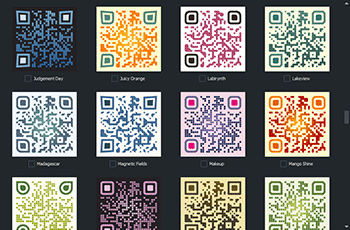
Built-in QR code templates
The software provides a set of pre-designed QR code templates that allows you to start designing immediately, even without a predefined user concept. Templates with different styles and visual forms are available, enabling a wide range of potential applications for the QR code. The graphic designer can be expected to have information about the intended applications of the customized QR codes (internet, social media, print media, advertising or business use, or other physical media). The Visual QR Code Designer offers a template with a default appearance when the application starts, which can be used to begin editing, while work can also be continued at any time with elements from the pre-installed template set. After selection, the template currently being designed adopts the characteristic visual properties of the selected template, allowing the style of the template being edited to be changed quickly at any time.
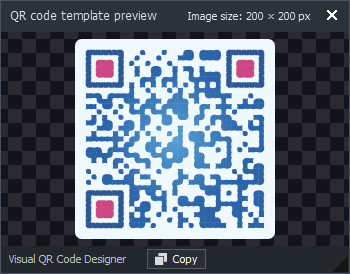
The selection interface contains 150 pre-designed QR code template samples. The template samples, sorted by name, include a mixture of light and dark base designs. Basic organizational operations can be performed on template elements, such as selection, deletion, and loading the most recently used set. Multiple selection corresponds to the favorites function; these selected elements can be handled separately by the reference PDF catalog program module when processing the catalog elements. The general display size of the template elements can be adjusted to any desired size using the control located in the lower-left corner of the panel.
Applying built-in templates has no effect on the data content of the currently edited template; it only changes its style to the new appearance. The structure and operation of the vector-based system ensure that displayed images, shapes, gradients, anti-aliasing, scaling, etc. can be displayed at unlimited magnification without loss of quality.
'><path d='M200.587,123.452V6.866L66.506,140.956h116.578C195.682,140.956,200.587,136.05,200.587,123.452z'/><path d='M345.844,460.372c-3.029,3.493-2.946,22.185-2.649,51.628h45.255c-10.136-17.876-22.278-34.012-30.938-44.966C357.513,467.034,350.024,455.643,345.844,460.372z'/><path d='M431.4,107.148c-19.556,36.316-30.492,70.84-29.451,75.801c1.013,4.933,4.246,8.148,13.416,2.378c3.902-2.444,19.129-10.824,36.688-23.514V75.792C444.36,85.631,437.17,96.463,431.4,107.148z'/><path d='M201.897,288.878c7.303-1.514,83.401-41.593,141.318-71.825c31.839-100.913,71.1-165.445,108.81-194.664C451.867,10.024,441.769,0,429.356,0h-202.84v139.051c0,15.339-12.486,27.834-27.816,27.834H59.947v61.614c41.974,6.281,93.546,34.728,138.475,60.379C199.844,289.018,201.042,289.056,201.897,288.878z'/><path d='M166.1,302.815c0,0-67.179-29.238-106.153-28.81v62.534c3.131-0.195,6.234-0.362,9.709-0.855C99.933,331.41,175.53,304.738,166.1,302.815z'/><path d='M308.608,380.354c0,0,15.961-97.458,24.917-122.579c-22.65,14.995-107.639,53.29-107.639,53.29S298.351,368.267,308.608,380.354z'/><path d='M350.099,418.472c26.645,32.582,51.033,66.994,66.019,93.528h13.239c12.514,0,22.696-10.183,22.696-22.697V193.075c-17.048,11.595-37.84,24.508-61.41,37.366C372.155,290.412,357.708,370.998,350.099,418.472z'/><path d='M201.451,322.511c-53.718,22.222-108.885,37.078-132.399,40.497c-3.168,0.464-6.104,0.725-9.104,1.059v125.236c0,12.514,10.192,22.697,22.696,22.697h215.178c-0.037-27.723,2.184-60.25,7.172-98.275C277.168,384.005,240.602,348.552,201.451,322.511z'/></g></g></svg>)
QR code reference catalog in PDF format
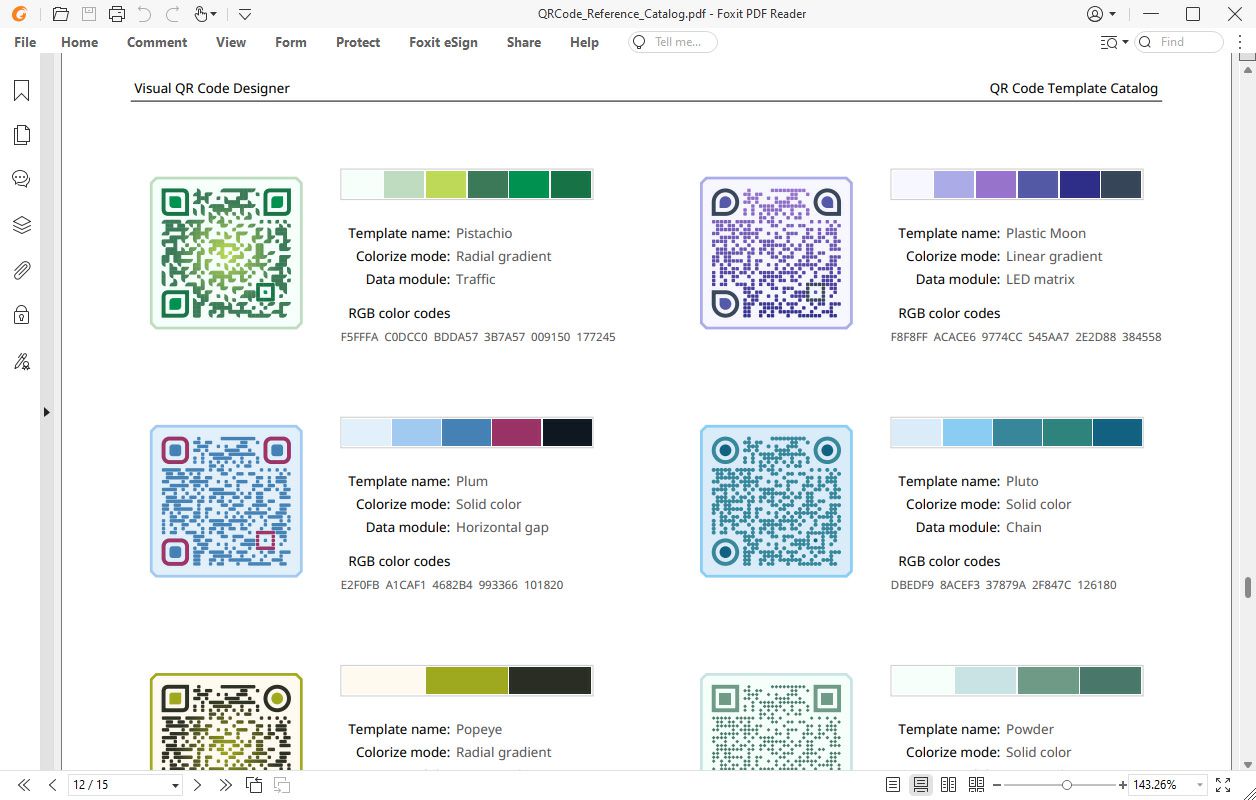
One of the software's special features allows catalog documents to be created by combining pre-designed color palettes or elements from the template set with QR codes having appropriately prepared visual appearances. By creating these style catalogs, a graphic design business, marketing company, or creative content agency can present its graphic work related to QR code design by specifying just a few simple parameters. The reference catalog files, which also have significant marketing value, are provided in PDF format and can present the creative QR code design portfolio of the business to clients in high quality.
The physical page format of the reference catalog can optionally be set to the A4 (ISO) or Letter (US) standard size. Document creation is available from both the application's color palette and pre-designed template panels. The QR codes printed into the output reference PDF retain the main parameters and graphic characteristics configured on the design surface. When template samples are selected, the graphic appearance will closely resemble the predefined template samples. When color palettes are selected, however, the forms configured by the user will take on the colors defined in the palettes for the corresponding QR code modules.
In addition to the language setting of the reference PDF catalog, the text data stored in the QR codes, header and footer data, optionally visible RGB color codes, and selected template elements can be specified. By customizing the document, the graphic design business creating the PDF can publish key information, including custom titles, information, and URLs pointing to its own website. Metadata for the output PDF can also optionally be configured, including title, subject, author, and keywords, making documents easier to search during archiving.
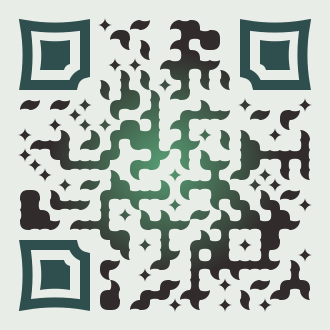
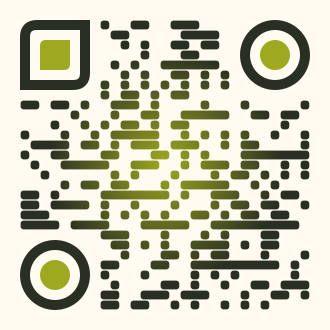
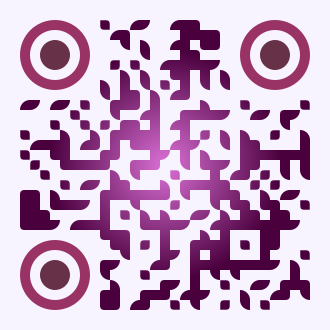
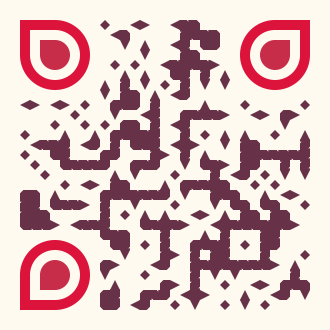
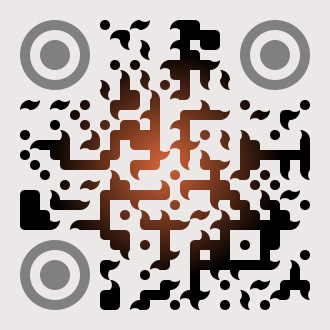
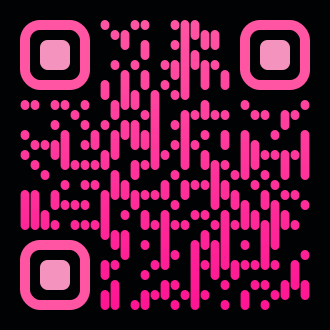
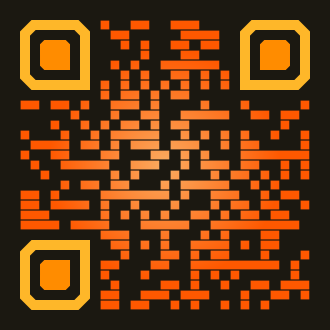
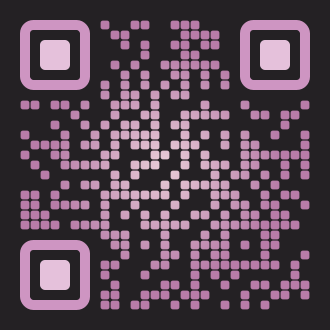
Ready-to-use vector graphic QR code templates




Encoding data types into QR code format
In addition to building and designing templates, the application is also capable of generating data structures prepared for specific tasks as QR codes. After selecting the type of data to be encoded, it can be saved in a file format appropriate for the task requirements. The type of data to be encoded and its intended use can be defined either before or after designing the template. Visual QR Code Designer supports numerous data structures commonly encountered in real-world applications. After selecting the appropriate data type and configuring its associated data fields, clicking the generate button creates a QR code containing the data. The completed code can then be saved in the selected file format using the export functions and is immediately ready for use.
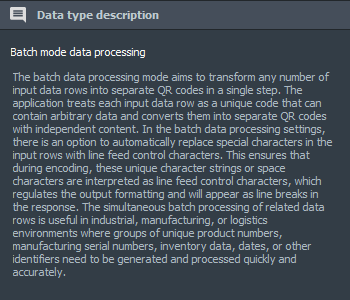
A short textual description for the selected type is displayed on the right side of the data type processing screen. For each type, a separate specialized descriptive text is displayed in the national language specified in the software, describing the main areas of use, characteristics, usage methods, and possible real-world applications of the data type being processed. This short informative text can be particularly helpful for less experienced users, while also supporting the work of more experienced professionals.
Data security and data protection were among the primary priorities during development, so the software does not collect or store any sensitive or personal information; all data processing and operations are performed locally on the computer running the program. The brief descriptions of the data types natively supported by the application can also help users make a quick and informed selection.

General website URL
Encoding a general website link or URL creates a QR code that directs the user to a specific web page. When the code is scanned, the phone or device automatically opens the specified web address in the default browser. The code content consists exclusively of the specified link available on the internet.

Plain text content
Encoding plain text allows a QR code to store text-based information. After scanning, the text is displayed on the device screen and can be copied or shared immediately. The process does not launch any application; it only displays the encoded content.

Sharing a URL on social nedia
A QR code for social sharing is designed to allow the specified external website link to be shared directly on various social media platforms after scanning. When the code is scanned, the user's device offers the sharing option on the selected platform. The QR code contains the URL to be shared and optionally a short description.

Communication software channel
A communication QR code allows the scanning device to automatically open a specific person's contact information in the appropriate communication application. The code can contain a link for initiating a text, voice, or video call. After scanning, the user is taken directly to the interface of the selected application (e.g. phone call or chat application).

Sending an email
An email QR code can be used to create a pre-filled email message containing a recipient, subject, and optionally message text. When the code is scanned, the device automatically opens the default email application with the specified data. The user can modify the pre-filled content in the opened message as needed.
'><path d='M448,0H64C28.6,0,0,28.6,0,64v256c0,35.4,28.6,64,64,64h128l-42.7,128l192-128H448c35.4,0,64-28.6,64-64V64C512,28.6,483.4,0,448,0zM128,234.7c-23.6,0-42.7-19.1-42.7-42.7s19.1-42.7,42.7-42.7s42.7,19.1,42.7,42.7S151.6,234.7,128,234.7zM256,234.7c-23.6,0-42.7-19.1-42.7-42.7s19.1-42.7,42.7-42.7s42.7,19.1,42.7,42.7S279.6,234.7,256,234.7zM384,234.7c-23.6,0-42.7-19.1-42.7-42.7s19.1-42.7,42.7-42.7s42.7,19.1,42.7,42.7S407.6,234.7,384,234.7z'/></g></g></svg>)
Sending an SMS
An SMS QR code can contain a predefined phone number and message text, which automatically appear in the messaging application when the code is scanned. The code contains the destination phone number and optionally a predefined text that is placed in the message body. After scanning, the phone's SMS application opens with the recipient and message pre-filled.

WiFi network access
A WiFi network access QR code contains data that allows the user to quickly and securely connect to a wireless network. When scanned, the device automatically recognizes the network name, encryption type, and password, and then offers the option to connect.

Cryptocurrency transaction
This data type is used to initiate a cryptocurrency payment request. The QR code contains the address of the wallet receiving the payment and optionally the requested amount, the specific cryptocurrency type, and additional accompanying information. After scanning the code, the compatible cryptocurrency wallet application automatically opens with the transaction data pre-filled.
'/></g></svg>)
Coordinate-based location
Providing a geolocation based on coordinates allows the user to immediately view a specific location in a designated or the device's default map application after scanning the code. The input contains latitude and longitude coordinates, from which the QR code generator creates a link that can be interpreted by the specified map application.

Calendar event or appointment
Event or appointment information is intended to allow the user to add an event directly to their calendar after scanning. The code contains the event name, location, start time, and optionally the end time. After scanning the QR code, the device automatically opens the calendar application and prepares a new entry using the encoded data.

vCard electronic business data
Encoding vCard business data allows a digital business card to be created. The QR code contains the person's basic public information, such as full name, company address, phone numbers, email address, website, and other shareable information. When the code is scanned, the phone automatically offers to save the data to the device's contacts.
' d='M31,16v9c0,0.55-0.45,1-1,1H2c-0.55,0-1-0.45-1-1v-8c0-0.55,0.45-1,1-1h1c0.55,0,1,0.45,1,1c0,0.55,0.45,1,1,1h6c0.55,0,1.201,0.402,1.447,0.894l0.106,0.211C12.799,19.597,13.45,20,14,20h4c0.55,0,1.201-0.403,1.447-0.894l0.106-0.211C19.799,18.403,20.45,18,21,18h6c0.55,0,1-0.45,1-1l0-1c0-0.55,0.45-1,1-1h1C30.55,15,31,15.45,31,16zM6,17h20c0.55,0,1-0.45,1-1s-0.45-1-1-1H6c-0.55,0-1,0.45-1,1S5.45,17,6,17zM6,14h20c0.55,0,1-0.45,1-1s-0.45-1-1-1H6c-0.55,0-1,0.45-1,1S5.45,14,6,14zM6,11h20c0.55,0,1-0.45,1-1s-0.45-1-1-1H6c-0.55,0-1,0.45-1,1S5.45,11,6,11zM6,8h20c0.55,0,1-0.45,1-1s-0.45-1-1-1H6C5.45,6,5,6.45,5,7S5.45,8,6,8z'/></g></svg>)
Batch processing of large volumes of data
Batch data processing is intended primarily for industrial, manufacturing, or logistics environments, where any number of input data rows can be converted into separate QR codes in a single step. The application treats each input data row as a unique code and converts each one into a separate QR code as independent content.

Processing large volumes of data into QR codes
Creating, managing, and integrating large volumes of data into operational processes can be a key factor in industrial, manufacturing, data processing, logistics, or other areas requiring group operations. In addition to producing individual visual designs and performing graphic design, the application can create even thousands of independent data items as QR codes in a single operation, resulting in significant savings in human effort, time, and costs.
The data processing module running locally on the computer hosting the software treats each data row as an independent block. During fast and accurate sequential data processing, the content of each individual data row goes through the same processing stages. After the repeated workflow and export process, QR code-based output files are created with the predefined style and appropriate data content.
Data intended for batch processing can be added to the program by clicking the Batch Data button in the data type panel. This is a simple multi-line text input form supplemented with several configuration options. Individual data items are interpreted row by row, with each data row resulting in a separate QR code. The rows can contain any number and type of data, which can be entered manually, loaded from a text file, or pasted from the clipboard.
In the data displayed when scanning the QR codes, explicit output line breaks can be inserted by setting a custom line break character sequence above the text field or by using the space character in the input rows. In this case, special replacement characters or the space character in the input data rows are encoded as line breaks, allowing multi-line text outputs to be created. The normalize button can be used to clean the rows containing data by removing whitespace characters from the beginning and end of the rows, as well as unnecessary empty rows from the data field.
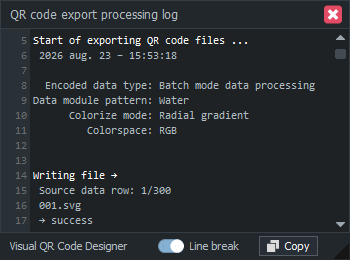
A process operation log documenting the process helps track the individual stages of batch-mode exporting. The log provides insight into real-time details of the export process and also contains useful supplementary and timing information that can be copied to the clipboard for later analysis. The export log window can be displayed at any time by clicking the dedicated button at the bottom of the export panel or by selecting the View ➟ Export Processing Log (CTRL+X) menu item in the program's main menu.
Screenshot gallery

Creating output files
Files containing the generated QR codes can be created from templates and data by properly configuring the controls available on the software's export panel. The upper section displays the available output file formats in a table, along with some of their key properties. When exporting, the intended use of the QR code and the conditions of its subsequent application must be considered, and the output format should be selected accordingly. The most important considerations may include web support, transparent background support, or the correct selection of the RGB/CMYK color space. The Visual QR Code Designer allows you to create multiple file formats at the same time during the export operation. The desired format or formats can optionally be selected from the table, and the generated files are saved to the output folder specified by the user.
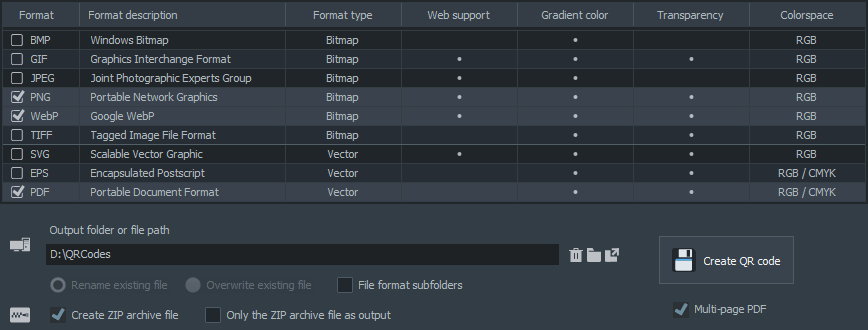
When exporting multiple file formats and a large number of files, filtering by file type can often be a useful feature. By enabling an optional switch, the software creates subfolders within the main output folder according to file type, and the files of the respective format are placed in them. This can be particularly useful when the program processes a large amount of data in a single export session (batch mode) and multiple output formats are required simultaneously to complete the task.
During export, an optional .zip format file summarizing the export can be created from the generated files. This compressed archive contains all output files created during the export, including the subfolders for filtering by format and their complete contents. When the compressed zip file option is enabled, it is also possible to write only this file to the storage device, containing the complete output file structure of the export.
Consistent file naming during batch data processing
Consistent naming of generated files can be particularly important when processing large amounts of data in batch mode. When encoding several hundred or even thousand data blocks and generating their corresponding output files, a significant number of files must be written to the storage device. Although it is possible to create a large number of files in a single folder, this can become difficult to manage over time. The file name builder module for batch data processing provides a way to create consistently manageable and transparent output file names. The file name builder for batch data processing allows file names to be tested and configured in advance so that the appropriate output names can be generated before the export process begins.
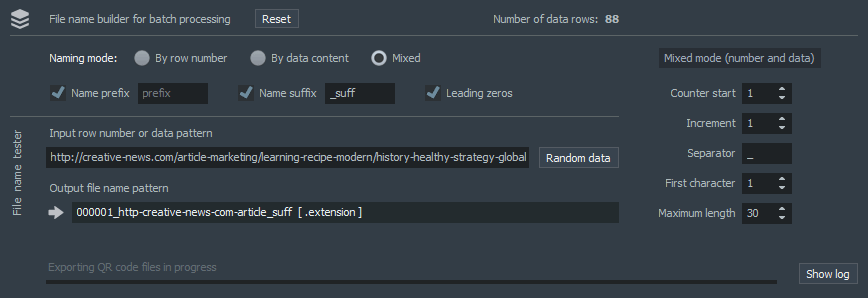
The names of output files created during export can be configured according to three different criteria. The first is based on the serial number in the data list, in which case the file is named using the respective serial number. The second is based on the text content of the data, and the third uses a mixed-mode naming convention. These options can be navigated using radio buttons, and the value of the output file name pattern field changes according to the selected option. On the right side of the panel, additional freely configurable fields are also available for fine-tuning the settings according to the selected option. A manual or random input pattern can also be specified, in which case the generated test file name pattern changes according to the user data and the selected mode.
Optional prefix and suffix parts can also be added to output file names. This makes it possible to associate the base file name pattern with additional information such as date, location, organizational unit, plant, designation, product number, other warehouse identifier, etc., which can later be used to define more precisely the required additional information for files containing QR codes. The leading zeros switch can be used to enable or disable automatic zero-padding for naming modes that also contain numbers (serial number-based and mixed modes), providing an elegant formatting style - 32➟0032, 124➟000124. The three different file naming methods can be freely combined with prefixes and suffixes. Clicking the default button restores the software's initial parameter values.
| Format | Name | Web support | Transparency | Advantages |
|---|---|---|---|---|
| BMP | Windows Bitmap | – | – | pixel-accurate, stable colors, simple structure |
As one of the simplest solutions for digital image storage, BMP uses a raster structure and therefore stores every pixel directly, resulting in predictable and precise image data handling. Due to the simplicity of its image structure, it preserves the original pixel information well, although the file size can increase significantly. The format uses few processing layers, allowing image data to be accessed quickly and processed easily in various graphics applications. Color information can be handled consistently, providing a suitable basis for image editing or technical workflows. Due to its raster nature, enlargement may make individual pixels visible, so the level of detail always depends on the original resolution. | ||||
| GIF | Graphics Interchange Format | ● | ● | fast loading, small size, sharp contours |
Optimized for handling simple graphic content, GIF uses a raster image structure that provides efficient rendering even with a limited color palette. It supports fast processing of visual elements while enabling the creation of small files. It is particularly well suited to sharp contours, icons and graphic elements where gradients play a smaller role. Storing frames sequentially also allows simple animated graphics to be displayed. Due to its raster structure, details do not remain completely sharp when enlarged, but at an appropriate size it preserves the character of graphic elements well. | ||||
| JPEG | Joint Photographic Experts Group | ● | – | photorealistic, small file size, rich color tones |
Widely used for storing photographic images, JPEG uses a raster structure designed to handle large amounts of image information efficiently. Optimizing image data can significantly reduce file size while the visual appearance often remains natural. It performs particularly well when rendering tonal transitions, shades and detailed surfaces. However, image information may gradually change during repeated saving, so this should be taken into account in editing workflows. Due to its raster structure, image quality is fundamentally determined by the available resolution. | ||||
| PNG | Portable Network Graphics | ● | ● | lossless, transparency, sharp details |
As an important component of modern digital graphics workflows, PNG has a raster structure and therefore provides accurate storage of detailed image information. It preserves the original quality of image data, making it reliable for both editing and publishing workflows. Fine contours, typographic elements and graphic details are displayed clearly, while transparent areas are also handled accurately. Image quality does not change significantly during repeated saving. Due to its raster structure, resolution remains a determining factor when enlarging the image, while at an appropriate size it provides excellent visual quality. | ||||
| WebP | Google WebP | ● | ● | small file size, transparency, efficiency |
Using modern image processing technology, WebP has a raster structure designed for efficient data storage and contemporary digital presentation. It handles the balance between image quality and file size flexibly, providing good results for various types of visual content. Both photographs and graphic elements can be stored efficiently, while transparent image areas and animations are also supported. Its modern structure fits well into today's web and digital workflows. Due to its raster structure, the level of detail is also determined here by the original resolution. | ||||
| TIFF | Tagged Image File Format | – | ● | high quality, high color depth, prepress accuracy |
In professional image processing environments, TIFF uses a raster image structure designed to store large amounts of detail and precise color information. The format is highly flexible in handling image data, making it a reliable choice for complex graphics and prepress workflows. It supports high color depth and various image data structures, enabling precise post-processing. Due to its high information content, the file size can typically be significant, while quality remains stable throughout a long processing chain. Due to its raster structure, scalability still depends on the available resolution. | ||||
| SVG | Scalable Vector Graphic | ● | ● | unlimited scaling, transparency, excellent quality |
Designed for creating scalable graphic elements, SVG uses a vector structure that displays shapes based on mathematical functions and structured parameters. Graphic elements remain sharp at any size, while the file size can remain favorable even for more complex drawings. In addition to web display, the structure handles lines, icons, logos and typographic elements well, while also allowing dynamic and interactive graphic content to be created in other applications. Due to its vector structure, it is resolution-independent and therefore provides consistent visual rendering across different displays and sizes. | ||||
| EPS | Encapsulated Postscript | – | ● | vector precision, scalable, prepress compatibility |
As an important component of professional graphic prepress, EPS is primarily designed to handle vector objects, while it can also contain raster elements. The mathematical description of graphic content provides scalability and precise shape rendering, which is particularly important during prepress preparation. Complex illustrations, logos and typographic elements can also be handled with high precision. The format has long been part of professional graphics workflows and is therefore supported by numerous design and desktop publishing systems. Due to its vector nature, graphic elements can be enlarged without loss of quality. | ||||
| Portable Document Format | – | ● | vector and raster, platform-independent, prepress support | |
Designed for consistent presentation of digital documents, PDF can handle both vector and raster graphic elements, ensuring accurate preservation of complex visual content. Text, images and graphic objects remain in a consistent structure regardless of the display system. It supports professional color management, multi-page documents and information required for prepress preparation. Its vector elements can be scaled without limitation, while the quality of raster content is determined by the original resolution. Due to its versatile structure, it is one of the most important carriers of graphic and marketing materials. | ||||

Special settings for exporting PDF files
The PDF format differs significantly from the other supported file formats. In addition to its vector-based foundation, it has other special features that are not available together in the other formats. These include support for multi-page documents, password protection, metadata handling, support for different color spaces, and the ability to set custom page sizes. The software uses these advantageous properties to provide comprehensive support for creating PDF output files.
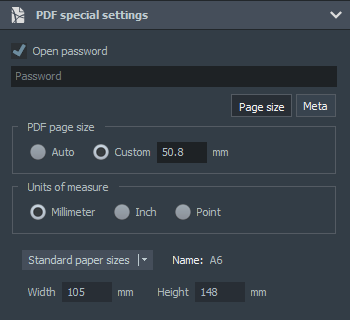
After selecting PDF from the file formats table, the special settings for PDF files section on the right side becomes available. Here, you can optionally specify the password required to open the generated document. A password-protected PDF file can later only be opened with this password, while the data content is protected by an encryption algorithm. During batch data processing, individual QR codes are displayed on separate pages in the PDF, while the multi-page PDF format can be enabled in the file settings of the export panel.
Precise PDF page sizes can be specified by enabling the custom page size radio button. The user-defined values can then be entered, while several standard paper sizes are available from the context menu on the panel. The size specification is also supported by the radio buttons for selecting the available units of measurement. The metadata associated with the PDF and useful when managing the document can also be specified here - additional information for the title, content, author, and keywords fields.
General image sizing for raster and vector formats
For bitmap-based or raster graphics formats (BMP, GIF, JPEG, PNG, WebP, TIFF), an important and relevant property is the dimensions of the displayed image, that is, the width and height of the image measured in pixels. For these formats, it is recommended to set this to as high a value as possible (the default raster image size is 600×600 pixels), but it should also be taken into account that the file size generally increases quadratically as the number of pixels increases. The base image size of raster formats can be specified by configuring the decimal field on the right side of the export panel.
When selecting vector graphics output formats (SVG, EPS, PDF), the explicitly specified image size is not significant in the current situation, because the vector graphics formats generated by the software can be scaled to any size without loss of quality. Therefore, the software does not provide an option to specify a fixed physical image size outside the PDF format; this can be set during final use. For further use, the dimensions of vector-based files can be precisely adjusted to any required value in the respective application (Adobe Illustrator - InDesign, Inkscape, CorelDRAW).
The appearance of the QR code design application
Image of the main design panel with the software's structural modules
Design panel and quick-access shape transformation settings
Color palette selection screen for the edited template
Selection panel for predefined QR code templates
Setting WiFi network access details in the QR code data type panel
Setting event or meeting details in the QR code data type panel
Bulk data processing screen with input data rows
QR code export panel with output file settings
Visual QR Code Designer software features
- Creating custom QR codes
- Vector-based rendering engine
- Matrix transformation functions
- RGB and CMYK color spaces
- Reference QR code catalog
- More than one hundred QR code templates
- Hundreds of color palettes
- QR code scanner function
- Batch mode bulk data processing
- Multipage PDF file output
- Encoding of predefined data types
- Custom error correction level and module size
- Bitmap and vector output formats
- ZIP compressed archive
- Processing log export
- Customizable uniform file names
- Local operating mode
- Multilingual graphical user interface
Download the creative QR code design and generation application
With the software, you can design and create conventional and uniquely customizable QR codes with a distinctive appearance using a few simple settings. The locally running Visual QR Code Designer application for Windows PC allows you to achieve special visual effects using pre-designed templates and color palettes. In addition to creating QR code catalogs, the software also supports batch processing of large volumes of data and produces them in high-quality bitmap and vector output formats.
Software datasheet and technical information
- Application name:
- Visual QR Code Designer
- Short description:
- Custom QR code design software. The application can create customized QR codes with distinctive or traditional appearances based on a set of shape templates. In addition to encoding common data types, it also enables the automated batch processing of large volumes of user data into QR codes within a single session.
- Current version:
- 3.02
- Release date:
- September 25, 2026
- Installer size:
- 50.39 MB
- Languages:
-
English,Deutsch (German),Español (Spanish),Português (Portuguese),Polski (Polish),Magyar (Hungarian),Français (French),Italiano (Italian),Čeština (Czech),Hrvatski (Croatian),Nederlands (Dutch),Dansk (Danish),Svenska (Swedish),Norsk (Norwegian),Suomi (Finnish),Lietuvių (Lithuanian),Български (Bulgarian),Türkçe (Turkish),Русский (Russian),Ελληνικά (Greek),Română (Romanian),简体中文 (Simplified Chinese),한국어 (Korean),ไทย (Thai),हिन्दी (Hindi),Indonesia (Indonesian),日本語 (Japanese),Tiếng Việt (Vietnamese)
- Operating System: Windows 7-11 (32, 64-bit)
- Processor: Intel Core 5 or AMD Ryzen 5, 3 GHz
- Memory: 4+ GB RAM
- Storage: 70 MB background storage
- Internet connection for checkings and updates
- Version 3.02 - (Released on Sep 25, 2026)
- Fixed random freezes that occurred during startup
- Version 3.0 - (Released on May 14, 2026)
- Vector-based generation engine NEW
- QR code matrix transformation functions
- Reference PDF catalogs from QR code templates and color palettes
- Added improved QR code templates
- Added input data types - vCard business data, geolocation maps
- Enhanced batch processing data
- Special PDF output features
- Re-designed graphical user interface
- Version 2.01 - (Released on May 11, 2023)
- Initial release
- Newest software functions
- Language check fix
- Inspirated by Free QR Code Generator Online
Software support for creating creative QR codes
This design and code generation application allows you to easily create conventional or distinctively designed QR codes for web content, professional marketing campaigns, product manufacturing, packaging processes, graphic design, engineering and industrial tasks, or logistics projects. The Visual QR Code Designer interface running on Windows is also available in several national languages and provides an integrated QR code scanner, hundreds of built-in templates and color palettes, as well as dozens of color gradient and shape patterns. Finished codes can be saved in various bitmap image and vector formats, such as PNG, SVG, EPS or PDF, and the application also supports the CMYK color space required for print production. Various data types can be encoded, including URLs, plain text, email addresses, phone numbers, SMS, WiFi access, calendar events, geographic coordinates, communication applications, vCard contacts, or even cryptocurrency transaction data.
The software features a native vector-based graphics engine that provides fast processing and drawing performance. Key features include creating reference catalogs in PDF format, allowing graphic design businesses to present their QR code design portfolios to clients in a clear and organized format. Another key feature is integrated batch mode data processing, which allows QR codes to be generated and exported in a single operation from independent data sets containing hundreds or thousands of entries, including as a multipage PDF. The bulk encoding process is supported by a logging subsystem that allows the steps of data processing to be accurately tracked.
When exporting encoded files, multiple files in different formats can be created simultaneously. The high-quality bitmap and vector output formats can be freely selected and combined with the creation of a single ZIP compressed archive. During development, particular attention was paid to data protection and data security requirements. The software relies exclusively on the resources of the local computer, ensuring that all user data and full control remain in the user's hands at all times.
Frequently asked questions
Many questions may arise regarding the use of the application's features, the design and generation of uniquely styled QR codes, data type encoding, batch creation of large volumes of data, common uses of export operations, and other technical information. The previously presented themed module descriptions provide more detailed guidance on the main features of Visual QR Code Designer, while the answers to the frequently asked questions below provide shorter and quicker explanations.