This easy-to-use conversion software was developed for fast PDF to Word conversion. The Free PDF To Word Converter application provides instant help for transforming existing PDF files into editable documents for personal, home, business, or educational use. The application can be used free of charge and without restrictions in Windows-based work environments. Once converted, the editable Word file can be modified as needed using any compatible document editing software.
PDF to Word converter for editable documents
PDF is one of the most widely used document formats today, used worldwide for business, educational, and personal purposes. Its popularity is mainly due to its ability to preserve the same appearance across all devices and operating systems. However, there are situations when you need to modify, expand, or reuse the content of a PDF file, which is not always easy because of the format's characteristics. In such cases, Free PDF To Word Converter provides an effective solution by enabling fast and simple conversion of PDF documents into editable Word format. With the program, PDF content can be transformed into a document that can be freely edited, saved, and further processed in just a few clicks.
Intelligent content extraction and formatting preservation
During PDF to Word conversion, the program extracts the text elements contained in the document and reorganizes them into an editable document structure. The goal is not merely to copy the text but to create a Word document that preserves the structure and formatting of the original file as accurately as possible. Free PDF To Word Converter uses intelligent processing technology that helps retain paragraphs, text layout, and basic formatting elements. As a result, the generated document can often be edited further with minimal post-processing, saving significant time.
The resulting Word document can be opened in many well-known word processing applications. The file can be used with Microsoft Word, LibreOffice Writer, and OpenOffice Writer, allowing users to choose the most suitable working environment. The generated documents can be managed not only on Windows systems but can also be opened and edited on macOS and Linux using compatible software. This is particularly beneficial for users who work across multiple platforms or want to share documents between different devices.
PDF to Word conversion made simple and efficient
One of the greatest advantages of the PDF format is that it preserves the original document structure and appearance. However, this also means that editing the content afterward can be difficult, especially if the original source file is no longer available. In many cases, even the document creator does not have access to the editable version, making the PDF file the only available document. PDF to Word conversion software provides a solution for such situations. This free software reliably converts PDF documents into Word format. The conversion process is fast, simple, and can be completed without special technical knowledge.
Editable Word documents for further use
Converting PDF files to Word format offers many advantages in everyday work. Converted documents can be easily modified, expanded, or updated, making them ideal for further processing contracts, reports, studies, educational materials, and other documents. Word files created with the software can be easily saved, printed, or shared with colleagues, clients, and partners. This PDF to Word converter provides a fast and practical solution for anyone who wants to access PDF content in an editable and flexible format.
PDF to Word conversion with Free PDF To Word Converter
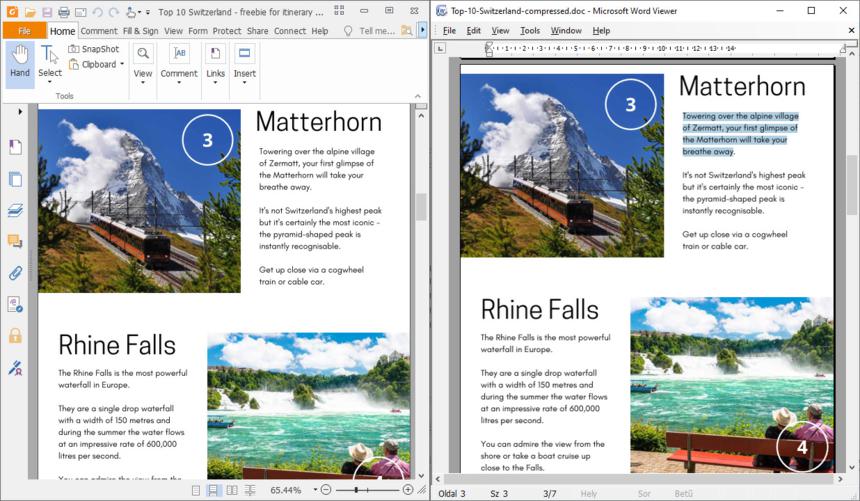
Download the free PDF to Word converter
During personal, office, business, or educational file-based workflows, converting an existing PDF file into an editable Word document is sometimes unavoidable. After conversion, the resulting Word document can be freely edited, modified, printed, and shared.
By downloading and using Free PDF To Word Converter, you no longer have to deal with complicated settings and configuration options during PDF to Word conversion. This free software was developed with simplicity in mind and is available to everyone at no cost, without restrictions in any usage scenario. Click the download button and start converting documents immediately after installation.
The PDF to Word conversion process
Free download
Thanks to its small size, the application can be quickly downloaded and installed on Windows in just a few steps. Using Free PDF To Word Converter requires no special knowledge, allowing you to start converting PDF documents immediately.
Intelligent conversion
The program automatically processes the content of the selected PDF file and converts it into an editable Word document. During conversion, it aims to preserve the original text structure and basic formatting elements.
Unlimited editing
The generated Word document can be freely modified, expanded, and reformatted in the most popular word processing applications. The file can be easily saved, printed, or shared for further use.
The popularity of the PDF format is mainly due to its portability, platform independence, and consistent appearance. However, there are many cases where the content of a PDF document needs to be modified, expanded, or processed in another format. Since direct editing of PDF files is limited, converting them into an editable document is often the most practical solution. This PDF to Word converter helps by transforming selected PDF files into Word (.doc) format in just a few clicks. Thanks to the conversion technology, the generated document can be easily edited and further processed.
Modern solution for PDF to Word conversion
One of the greatest advantages of the PDF format is that it preserves the original appearance of a document, but this can also become a disadvantage when editing is required later. Without the original source files, modifying a PDF document is often difficult or impossible. To solve this problem, many online and desktop PDF to Word converters have appeared over the years. Free PDF To Word Converter is a long-standing, reliable, and free-to-use software solution that provides effective assistance in converting PDF files into Word documents.
Efficient content extraction and document conversion
The essence of PDF to Word conversion is extracting the text and structural elements contained in the document and rebuilding them in an editable format. The resulting Word document can be opened in many popular word processing applications, including Microsoft Word, LibreOffice Writer, and OpenOffice Writer. Preserving the original layout and formatting of the document as accurately as possible is a key consideration during conversion. To support this, the document converter also offers basic formatting preservation options that can be enabled when creating the output document.
Flexible editing and usage options
The application creates editable Word files from PDF documents, which can be further modified in any compatible document editor. The generated files can be used not only on Windows systems but can also be opened and edited in macOS and Linux environments using suitable software. Converted documents can be freely saved, expanded, printed, or shared with other users, making them an ideal solution for both home and office use.
Free PDF To Word Converter interface structure
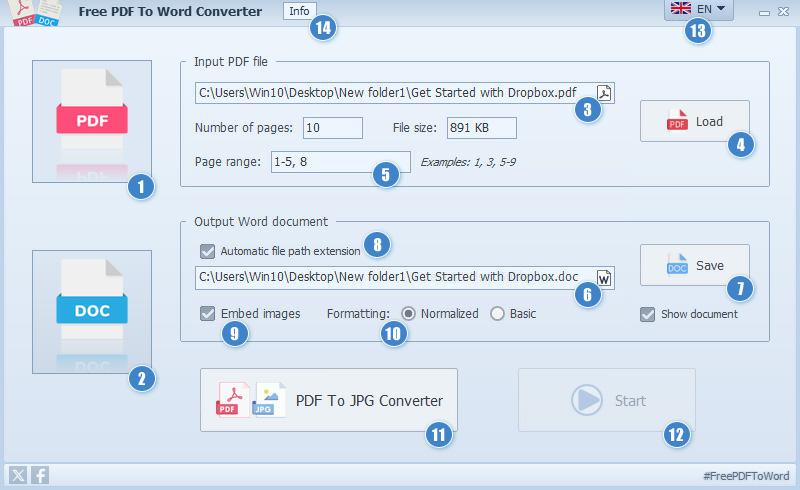
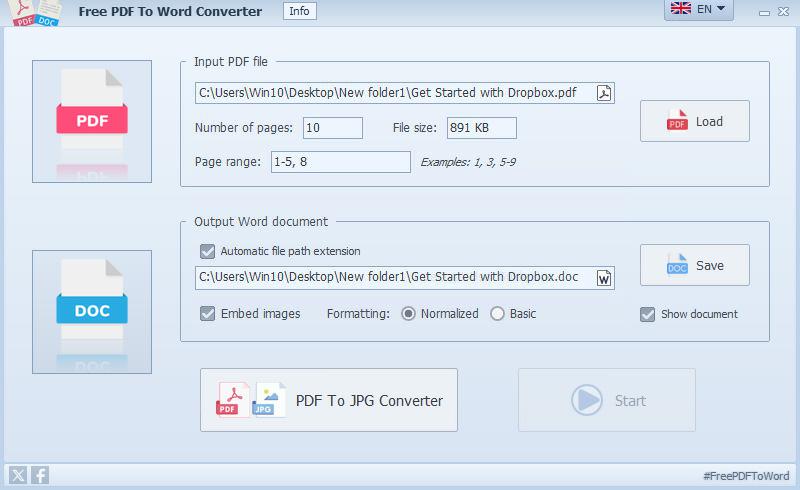
- Open the selected source PDF file
- Open the converted Word document
- Specify the source PDF file path
- Load the PDF file to convert
- Set page range
- Specify the Word document path
- Select output file save location
- Optional path auto-completion
- Embed images into the output Word document
- Word document layout settings
- Professional PDF to JPG Converter
- Start/stop conversion
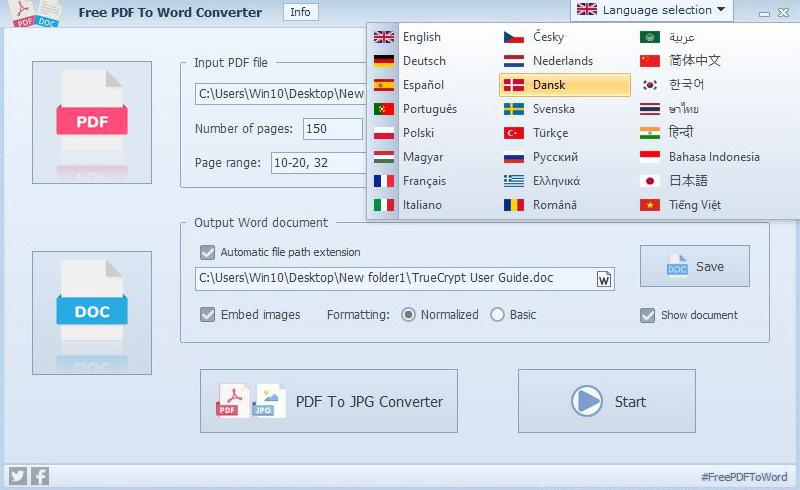
- Application language selection menu
- Display software information
Steps to convert a PDF into a Word document
- Add the PDF file you want to convert or click the source file path
- If needed, set the page range according to the example (leave the page range field empty to convert all pages)
- Set the save location for the output Word document (if automatic file extension is enabled, you can override it by specifying the path directly)
- If you need to extract embedded images from the PDF, leave this option enabled
- Select the content layout mode for the Word document
- Click the Start button to begin the conversion process
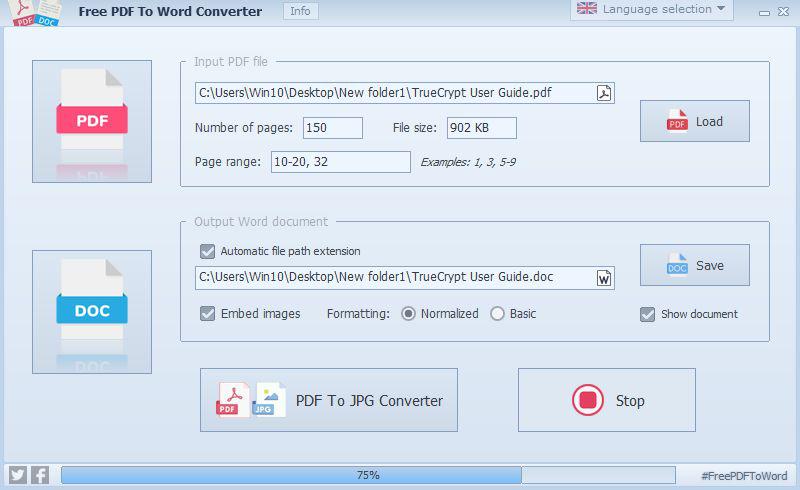
- Wait for the conversion process to finish; the progress indicator will display the completion percentage
- When the output Word document is ready, click to view the file with an external viewer
Convert PDF to Word in a few clicks
Convert password-protected PDF files to Word format
The PDF-to-Word converter also supports password-protected PDF documents as input files. When selecting password-protected PDF files, the opening password must be provided. Without it, the PDF metadata and content cannot be read, so the password is required to open the document. In such cases, the PDF content is usually encrypted to prevent unauthorized access.
Naturally, unauthorized PDF access is not possible. Processing encrypted files requires knowledge of the opening password. Once the password has been entered, all program functions can be used just as with non-protected PDFs. During a session, the software remembers passwords for protected PDFs, so they do not need to be entered again when reopening the same files.
Complete security for user data
Some online PDF-to-Word converters do not transparently handle the confidential data contained in uploaded PDF files. Free PDF To Word Converter provides a fully offline solution and does not use any cloud-based or internet-dependent services. The software can be installed and used independently, requiring no external software components beyond the minimum system requirements. All files, documents, and data remain under the owner's full control and are kept secure at all times.
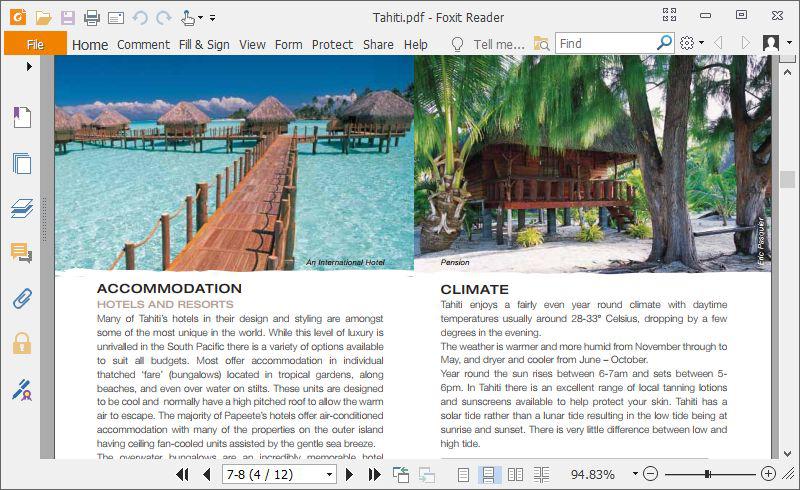
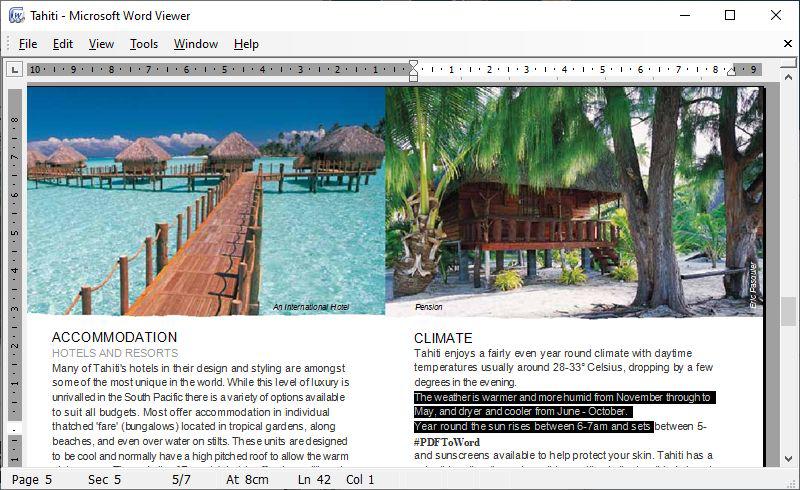
Key features of Free PDF To Word Converter
- Cost-effective PDF-to-Word conversion
- Free to use in any environment
- Fast conversion performance
- Password-protected PDF files
- Multi-page PDF support
- Editable output Word document
- Text, paragraph, image, table, and list handling
- Output Word document formatting options
- Preserves document layout
- Drag-and-drop support
- Selectable page ranges
- Independent standalone operation
- Easy-to-use multilingual interface
- Data security and privacy
Download Free PDF To Word Converter
This PDF-to-Word converter provides an instant solution for converting PDF files into editable Microsoft Word documents while preserving the original formatting of text, tables, images, and paragraphs. Support for multi-page and password-protected PDFs, combined with strong privacy protection, makes it an ideal choice for simple and efficient document conversion tasks.
Software datasheet
- Application name:
- Free PDF To Word Converter
- Short description:
- Free conversion of PDF files to Word documents. The application allows you to easily convert PDF files into Word document format.
- Current version:
- 4.1
- Release date:
- January 14, 2024
- Installer size:
- 17.49 MB
- Languages:
-
English,Deutsch (German),Español (Spanish),Português (Portuguese),Polski (Polish),Magyar (Hungarian),Français (French),Italiano (Italian),Čeština (Czech),Hrvatski (Croatian),Nederlands (Dutch),Dansk (Danish),Svenska (Swedish),Norsk (Norwegian),Suomi (Finnish),Lietuvių (Lithuanian),Български (Bulgarian),Türkçe (Turkish),Русский (Russian),Ελληνικά (Greek),Română (Romanian),简体中文 (Simplified Chinese),한국어 (Korean),ไทย (Thai),हिन्दी (Hindi),Indonesia (Indonesian),日本語 (Japanese),Tiếng Việt (Vietnamese)
- Operating System: Windows 10-11 (32, 64-bit)
- Processor: Intel Core 5 or AMD Ryzen 5, 2+ GHz
- Memory: 4+ GB RAM
- Storage: 30 MB background storage
- Internet connection for updates (optional)
- Version 4.1 (Released on Jan 14, 2024)
- Proper window positioning at start
- Updated outbound links to fmcoders.com domain
- Minor software updates
- Version 4.07 (Released on Jun 1, 2023)
- Minor memory allocation fixes
- Small GUI updates
- Version 4.05 (Released on December 6, 2022)
- Minor improved conversion engine
- Fixed Windows system scaling and layout settings
- Version 4.0 (Released on June 16, 2022)
- Improved PDF to Word document conversion
- Unicode file name support
- Multilingual graphical user interface
- Choosable PDF converting modes
- Preview option for PDF files and Word ducuments
- Version 3.5 (Released on Dec 16, 2018)
- Faster conversion up to 10%
- Version 3.46 (Released on Nov 22, 2018)
- Improve memory handling
- New GUI design
- Remapped internal structure
- Some bug fixes
- Version 3.2 (Released on Sep 12, 2018)
- Many software feature updates
- Intelligent conversion engine updates
- New impressive software skin
- Version 1.6 (Released on Feb 20, 2014)
- Fixed installer
- Version 1.0 (Released on Apr 5, 2012)
- Initial release
- Used Embarcadero RAD Studio IDE platform
Free document conversion tool
Free PDF To Word Converter provides advanced document conversion between PDF and Word formats. With its clear and easy-to-use interface, PDF and Word conversion tasks can be completed with just a few settings. The program supports both single-page and multi-page PDF files and can properly handle documents protected by an opening password. In the generated Office Word document, the software accurately processes text paragraphs, lists, and tables according to language settings, while also preserving the placement of embedded images. In addition to optional page range selection for conversion, this free application supports more than two dozen languages for users.
Questions about the PDF-to-Word conversion process
Software summary
Free PDF To Word Converter was developed specifically for converting PDF files into Office Word document formats. It supports multi-page PDFs, handles password-protected input files, accurately converts text, paragraphs, tables, and images while preserving the original layout, and supports the language used in the document. With its easy drag-and-drop functionality, external file viewer support, and strong data and user privacy protection, the software is a suitable choice for simple PDF-to-Word document conversion tasks.
The application protects sensitive data and user information through a fully offline operating mode that prevents unauthorized access to processed files. From text, paragraphs, and tables to images, the PDF converter accurately preserves formatting and layout in Word documents, including valuable Unicode support. The program is free to use in any work environment and for any purpose.