FM PDF To JPG Converter Pro
Extract PDF Content into Reusable Files
The professional PDF-to-JPG converter transforms PDF files into high-quality images, supports batch conversion, extracts embedded images and text, and exports PDF content in a structured format.
PDF to JPG Image Converter
Batch convert PDF files into JPG and other image formats while extracting embedded images, text, and special URL links from PDF documents.
The FM PDF To JPG Converter Pro application for Windows provides a fast and efficient solution for converting PDF files into images while also extracting embedded images and text from documents. Thanks to its advanced configuration options and batch processing capabilities, it is an ideal tool for both individual users and businesses handling large volumes of PDF documents.
Batch processing of PDF documents
The software supports batch processing, allowing multiple PDF documents to be processed simultaneously, significantly reducing manual work. It is an ideal solution for archiving, document management, and high-volume image generation.
Export PDF pages as images
Convert PDF pages into JPG, PNG, TIFF, BMP, GIF, and WebP bitmap image formats. Flexible output settings allow images to be optimized for web publishing, professional printing, or long-term archiving.
Extract text and images from PDF
The application not only converts PDF pages into images but also extracts embedded text and images from PDF documents. This is especially useful for data processing, content migration, and document archiving.
Full control over output quality
Output settings can be fine-tuned to match your requirements, including image quality, color mode, and page range. Detailed configuration options ensure the optimal balance between image quality and file size.
The software is designed for users who regularly work with PDF documents, including graphic design studios, publishing companies, office environments, engineering and architectural firms, digitization and archiving organizations, as well as software development teams. It provides an efficient solution for both small-scale file conversion and batch processing of large PDF collections. Automated workflows, advanced conversion settings, and flexible export options enable fast, consistent processing of image and text content with minimal manual intervention.
The application offers a wide range of customization features to tailor output images to your specific requirements. To achieve the desired image quality and resolution, you can configure the supported output image format (BMP, GIF, JPEG, JPEG 2000, PNG, TGA, TIFF, WebP, and other raster formats), rotation angle, sampling and DPI values, compression level, and choose between RGB and grayscale color spaces.
Download the FM PDF To JPG Converter Pro application for your Windows PC to perform fast, high-quality PDF-to-image conversion into JPG, BMP, GIF, PNG, TIFF, and WebP formats. It also includes a built-in PDF viewer. The software supports batch PDF-to-image conversion, reusable processing profiles, and structured extraction of embedded PDF images and document text.
Batch PDF conversion
Features and capabilities of the PDF to JPG conversion software
The software features are designed to make every step of PDF conversion easy to customize, from selecting the desired image format and fine-tuning output image quality to managing reusable processing profiles. It also allows you to extract images and text from PDF files, enabling the most common document processing tasks to be completed within a single application.
Batch PDF to JPG conversion
The PDF to JPG converter allows you to process a single document or even hundreds of PDF files quickly and automatically, significantly reducing the time required to convert large document collections. With the batch processing mode, PDF pages can be converted into high-quality JPG images with minimal user interaction, making the software ideal for archiving, digitization, and document management tasks. Before processing, you can select the page ranges to convert, and the entire process runs locally on your computer and can be started in just a few simple steps.
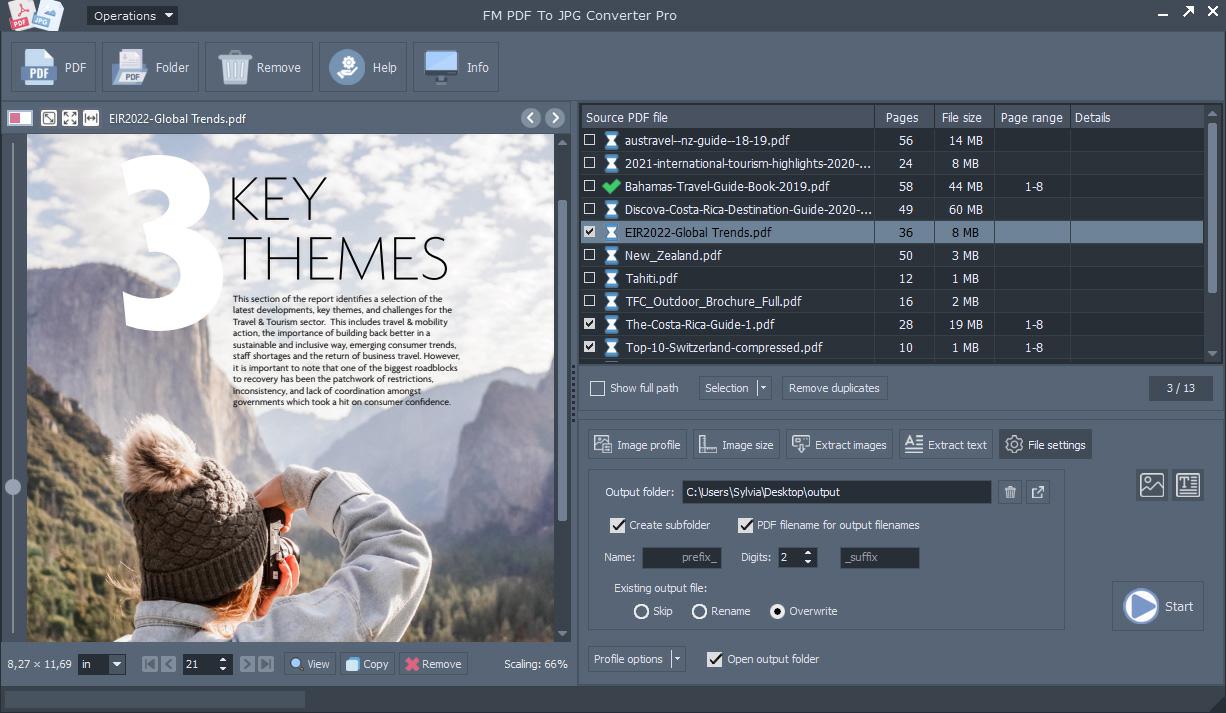
Convert PDF pages to images
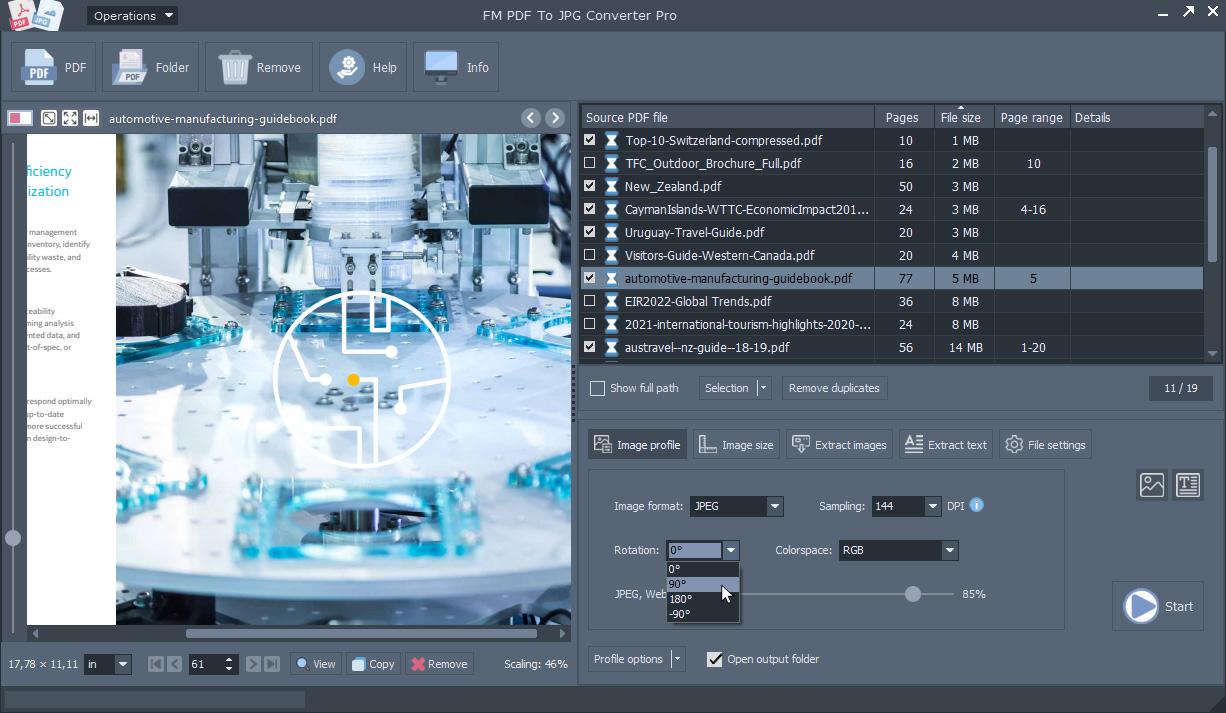
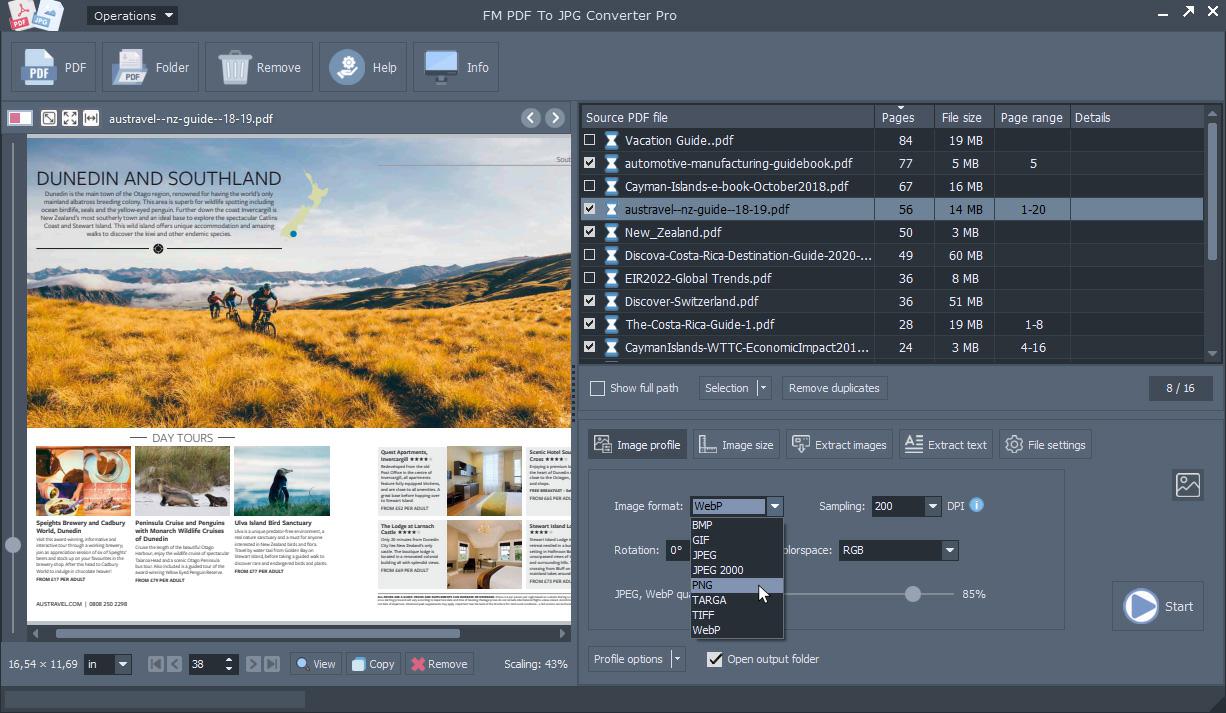
The application enables fast, high-quality conversion of PDF document pages into JPG, PNG, TIFF, BMP, GIF, and WebP image formats, making the generated images immediately suitable for a wide range of uses. Detailed image settings allow you to easily control the PDF to image conversion process. Image resolution (DPI), JPEG compression quality, image rotation, and color mode (RGB or Grayscale) can all be precisely configured to define the final output image. As a result, converted images can be optimized for web publishing, digital archiving, documentation, presentations, or print production.
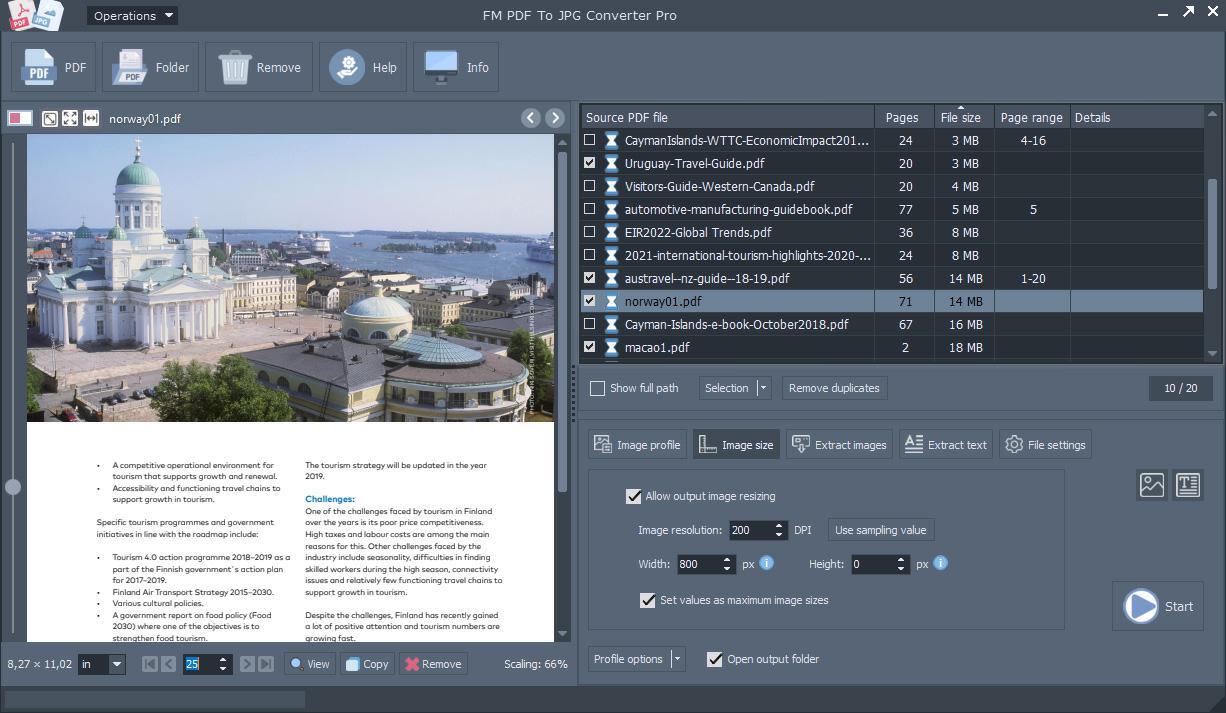
Fine-tune output image settings
Detailed output image settings allow you to precisely adjust the appearance and size of images generated from PDF documents to match your intended use. During conversion, you can configure image scaling, specify a fixed image width or height, define the maximum image size, and set the resampling DPI value based on the source PDF. Output resolution (DPI), JPEG compression quality, color mode, and image rotation can also be fine-tuned, allowing you to create smaller image files when needed, for example for web use.
Reusable session profiles
Session profiles allow you to save frequently used PDF conversion and image settings into a single configuration that can be reused later with just a few clicks. The software lets you save, load, and set these session profiles as the default, eliminating the need to configure the same parameters every time. This is especially useful for recurring PDF to JPG conversion tasks, batch document processing, or workflows requiring consistent output settings. Using previously saved session profiles not only saves significant time but also reduces the risk of errors while ensuring that every PDF conversion is performed using predefined, consistent settings.
Extract embedded PDF images
The software allows you to directly extract embedded images from PDF documents without first converting entire document pages into images. Native images can be saved in their original quality, making this especially useful for archiving, graphic design, desktop publishing, or reusing marketing materials. The application can extract both the rendered image content displayed by the PDF and the original embedded images, allowing you to choose the export method that best fits your needs. The image extraction process includes intelligent filtering options along with automatic file naming and folder organization. You can define a minimum image size so insignificant graphics or small icons are ignored automatically, while duplicate images appearing multiple times in the document can also be filtered out.
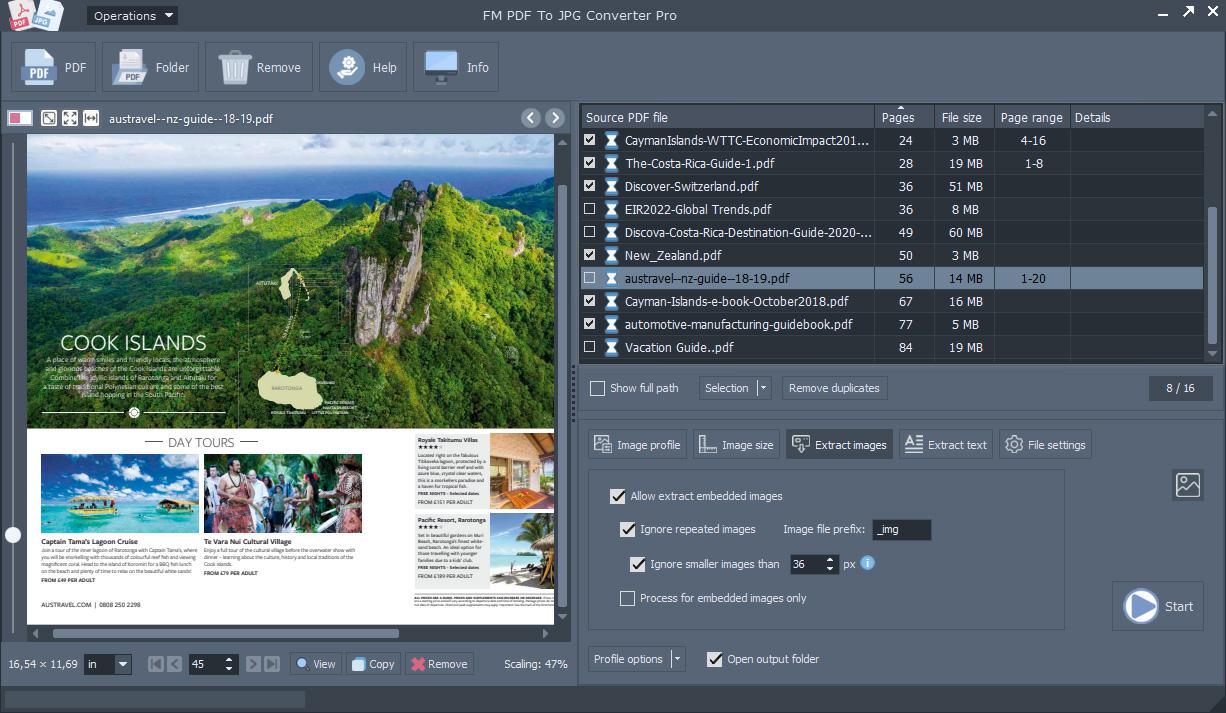
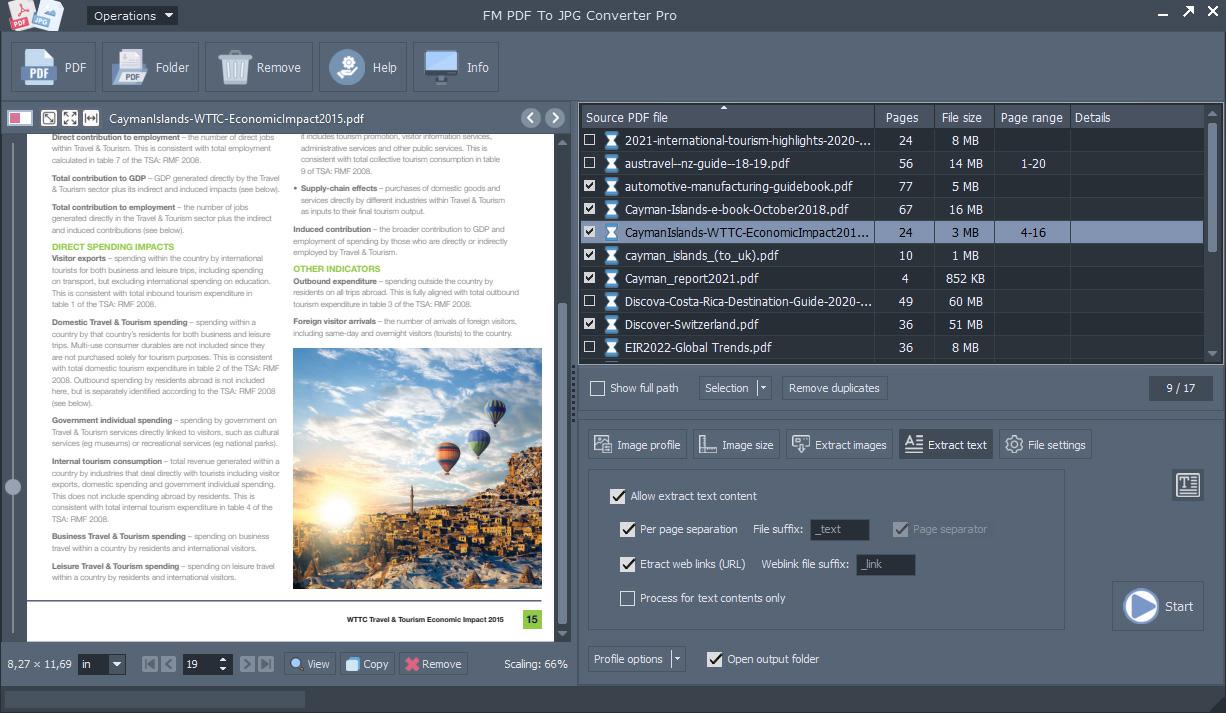
Extract PDF text content
The PDF text extraction feature enables fast and accurate export of the complete text content from PDF documents, making it easy to reuse for archiving, document management, content analysis, or publishing tasks. Text can be extracted from the entire document or only selected pages and saved into a single file or into separate files for each page. The software provides UTF-8 support to ensure that characters and special symbols from documents in different languages are preserved correctly in the output files. In addition to extracting text content, the application can automatically detect internet URL links contained in PDF files and export them into a separate list, which is especially useful when processing web resources, marketing materials, or large document collections.
The PDF to JPG conversion process
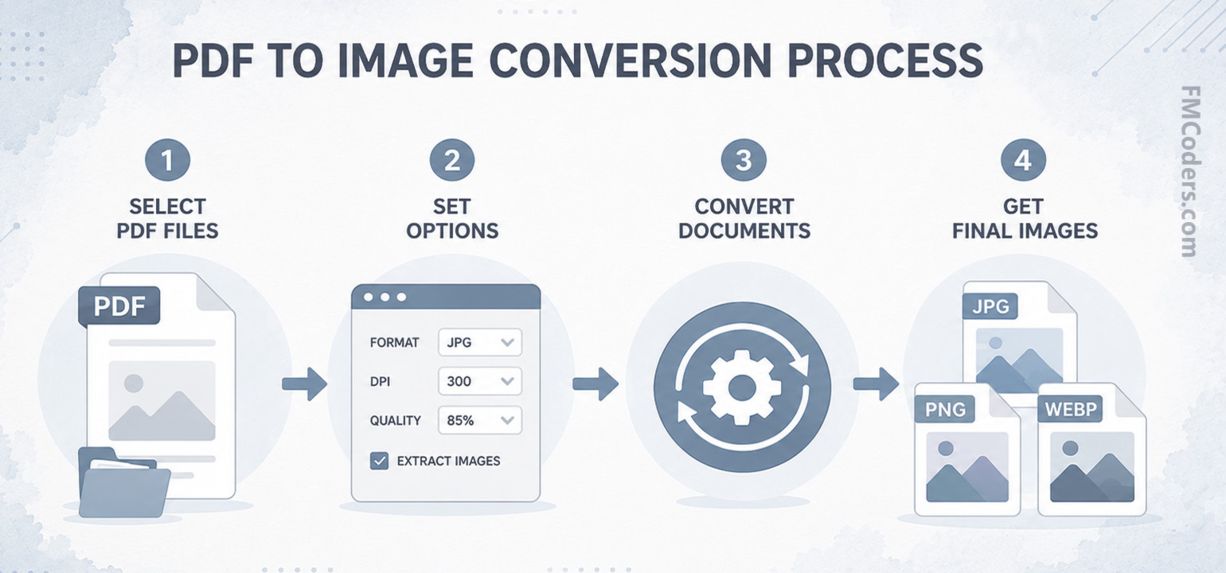
Main steps of the document conversion application's batch processing workflow
Add PDF files
Select the PDF documents you want to process, or add multiple files and entire folders at once for fast batch conversion. If required, enter the PDF opening password. With the built-in PDF preview, you can review the document contents before processing.
Configure output settings
Choose the desired image format, resolution, image quality, and other conversion settings, or load a previously saved processing profile. If needed, images and text can also be extracted from PDF documents as part of the same processing workflow.
Convert with a single click
Start the process and the program will automatically generate the selected image formats while saving extracted images and text content. Thanks to fast batch processing, even large numbers of PDF documents can be processed in a short time.
Converting PDF files into images is a practical solution whenever document content needs to be shared, edited, or displayed in a more accessible format. Converting PDF pages into JPG, PNG, TIFF, or WebP image files is ideal for web publishing, presentations, social media sharing, and systems that do not support direct PDF document handling.
Exporting PDF pages as image files also simplifies document archiving, graphic editing, and print preparation. Batch PDF conversion is especially useful for businesses, offices, and organizations that regularly need to save large numbers of PDF files as images or extract embedded images and text for further processing.
Efficient PDF to JPG conversion workflow
Ready to use instantly
After downloading and installing the FM PDF To JPG Converter Pro conversion software, you can start converting files immediately.
Add PDF files to the list, configure the settings, then click the Start button to begin.
Excellent JPG image quality
The program can generate separate JPG and other bitmap image formats from input PDF files on a page-by-page basis.
If needed, use the options to save embedded PDF images, text content, and URL links.
Convert PDF to JPG on a Windows desktop
The primary purpose of the PDF To JPG Converter Pro application for Windows is to let users convert PDF documents into JPG images as quickly and easily as possible, without requiring an internet connection or third-party cloud services. The entire conversion process is performed locally on the user's own computer, which not only improves processing speed but also ensures complete data privacy—your documents never leave your device, providing maximum security even for sensitive or business information.
Flexible settings and preserved image quality
The software's customization options allow users to adjust the resolution, color depth, and compression level of the selected JPG/JPEG or other output image formats to match the intended use, whether for web publishing, print production, or archiving. During the PDF to JPG conversion process, the program preserves the original PDF document's color accuracy, contrast, and sharpness, which is especially important in visually demanding applications.
Efficient PDF processing and content extraction
In addition to converting PDF pages into JPG images, the software also enables you to extract embedded images and text from PDF files, as well as collect URL links contained within the text. Thanks to batch processing, multiple PDF files or all pages of a document can be converted simultaneously, significantly speeding up the processing of large document collections.
Each converted PDF page is saved as a separate JPG file, allowing you to organize the output within your own folder structure for efficient file management and easy retrieval. The program also supports selective page conversion, so you only need to convert the pages you actually require, saving both time and system resources.
Download the PDF to JPG conversion software for free
By downloading the FM PDF To JPG Converter Pro application, you can immediately test its high-speed conversion performance in your own environment while experiencing its intuitive user interface and flexible batch processing capabilities. Click the Download button to start your free download, then install the program and begin converting your PDF files into bitmap images right away.
Image gallery – FM PDF To JPG Converter Pro
PDF processing capabilities and professional conversion features
Processing PDF documents involves much more today than simple file conversion. The software provides a comprehensive set of tools for converting PDF pages into images, extracting embedded images and text content, and efficiently processing large document collections in batch mode. The generated images can be saved in JPG, PNG, BMP, GIF, TIFF, WebP, and other formats, allowing you to choose the most suitable output format for any purpose. The technical overviews below explain the key features, available settings, and practical benefits that simplify document archiving, graphic content reuse, and the automation of everyday PDF processing workflows.

Batch PDF processing for large document collections
When processing large numbers of PDF documents, it is essential that the conversion workflow is fast, transparent, and requires minimal user interaction. The software's batch PDF processing feature allows hundreds or even thousands of documents to be combined into a single workflow, while source files can be easily listed, sorted, and loaded from entire folders, including recursive scanning with unlimited folder depth. Before processing, you can open password-protected PDF documents and select specific page ranges, so there is no need to convert every page. The built-in PDF viewer lets you preview document contents, browse pages, view the current page, or even copy it to the clipboard, making preparation for processing significantly easier.
Since PDF documents are converted into images entirely on your local computer, your files are never uploaded to external servers or cloud services during processing. This is especially important when working with confidential or business documents where data security is a top priority. The software continuously reports the processing status, allowing you to monitor the current conversion progress with a progress indicator, while the operation can be safely interrupted at any time if necessary. Automated workflows are further accelerated by saveable session profiles, enabling frequently used PDF conversion settings to be reapplied with a single click. As a result, batch PDF conversion becomes not only faster but also more consistent and predictable, whether you are handling recurring tasks or processing large document archives as a one-time operation.
| Format | Description | Web support | Transparency | Advantages |
|---|---|---|---|---|
| JPEG | Joint Photographic Experts Group | ● | – | small file size, ideal for photos, widely supported, high quality |
JPEG or JPG is one of the most widely used image formats today, primarily used for storing photographs and highly detailed images. Its popularity comes from its excellent balance between image quality and file size, making it an ideal choice for web publishing, digital photography, and everyday sharing. It is supported by virtually all devices, web browsers, and image editing applications, ensuring seamless compatibility across platforms. Most digital cameras and smartphones use it as their default image format. It is ideal for general-purpose use, especially when small file sizes and fast transfer speeds are important. It is also one of the most common formats on websites, social media platforms, and online galleries. | ||||
| PNG | Portable Network Graphics | ● | ● | transparent background, lossless image, ideal for logos |
PNG is a popular image format for digital graphics where excellent image quality and sharp rendering are essential. It is especially well suited for logos, icons, screenshots, and web graphics, as it preserves fine details and crisp edges. It is also commonly used when transparent backgrounds are required, allowing images to blend seamlessly into different layouts. Thanks to its broad compatibility, it is fully supported by virtually all modern browsers and image editing software. PNG is an excellent choice for web use, particularly when graphic quality is the top priority. Its reliability and versatility have made it a standard format in web design and digital content creation. | ||||
| WebP | Google WebP | ● | ● | small file size, transparency, animation, modern web |
WebP is a modern image format designed primarily for web use, allowing images to load faster while maintaining excellent quality. More and more websites use it because it improves page loading speed and reduces bandwidth usage. Its versatility makes it suitable for photographs, illustrations, icons, and simple animations. Most modern browsers and many image editing applications fully support it, and its adoption continues to grow. It is particularly beneficial for projects where performance and fast page loading are important. WebP has become one of the leading image formats in modern web development. | ||||
| BMP | Windows Bitmap | – | – | lossless image, excellent image quality |
BMP is one of the oldest and most widely recognized image formats, primarily used when preserving the original image quality is more important than minimizing file size. Its simple structure makes it compatible with many image editing applications and operating systems, making it a common choice for basic image processing tasks. Since image quality remains unchanged, it is well suited as an intermediate format during editing workflows and for archival purposes. However, its large file size makes it less efficient in terms of storage space. Even so, BMP continues to play an important role in educational, development, and technical environments. | ||||
| GIF | Graphics Interchange Format | ● | ● | transparent background, fast loading, simple graphics |
GIF has played a significant role in digital content since the early days of the internet. Thanks to its simple design, it loads quickly in most browsers and applications, making it a popular choice for icons, banners, and small animated graphics. Although it is not suitable for detailed photographs, it still performs well for simple graphics and bold illustrations. It is especially popular on social media and in online communication because it supports short animations. Its simplicity and broad compatibility ensure that GIF remains widely used today. | ||||
| TIFF | Tagged Image File Format | – | ● | print quality, high resolution, professional |
TIFF is a standard image format in professional graphics and printing environments where the highest possible image quality is essential. It is widely used for archiving high-resolution photographs, scanned documents, and artwork because it provides a reliable long-term storage solution. Photographers and graphic designers rely on TIFF to preserve every detail with maximum accuracy. Although TIFF files are generally larger, they deliver outstanding quality for editing and professional printing. It remains an essential format in professional imaging workflows. | ||||
| JP-2K | JPEG 2000 | – | – | high detail, efficient compression, archiving |
JP-2K, also known as JPEG 2000, is an advanced image format designed for applications where both high image quality and efficient storage are essential. It is primarily used in professional environments, digital archiving, medical imaging, and cultural heritage digitization. Its excellent level of detail makes it ideal for applications requiring precise image analysis. Although it is less common in everyday web use, it remains highly valuable in specialized industries. Its reliability and advanced image handling capabilities make it a preferred choice for long-term storage and professional image processing. | ||||
| TARGA | Truevision TGA | – | – | ideal for textures, transparency, game development |
TARGA is an image format widely recognized in computer graphics, video game development, and digital animation. It is used in workflows where high image quality and further editing flexibility are essential. It is particularly well suited for textures, visual effects, and graphic assets because it reliably preserves complex image data. Although less familiar to everyday users, it has long been supported by professional graphics software. Thanks to its stability and high image quality, TARGA remains an important format in many creative industries, especially digital content creation and 3D graphics. | ||||

How PDF documents are converted into JPG images
Converting PDF documents to JPG format is beneficial in many situations where document pages need to be used as easy-to-manage image files. JPG images are ideal for web publishing, presentations, electronic archiving, or whenever you want to quickly share individual document pages by email or through other applications. The software is primarily designed for PDF to JPG conversion, while also allowing you to preview documents before processing, select the page ranges to convert, and open password-protected PDF files. The entire conversion process takes place exclusively on your local computer, ensuring that sensitive document content is never uploaded to external servers or cloud services.
The quality of JPG images created from PDF documents can be configured in detail, making it easy to optimize the output for its intended purpose. You can adjust the resolution (DPI), JPEG compression level, color mode—such as color or grayscale—as well as image rotation and scaling. This makes it possible to create smaller image files for websites or high-resolution files for printing and archiving. During batch PDF conversion, the software can automatically name the generated image files based on the source document, organize the results into separate subfolders, and create a consistent file naming system by adding prefixes and suffixes. Whether you are archiving hundreds of invoices, sharing technical documentation as images, or digitizing newspaper pages, the detailed settings ensure that the converted JPG images are always produced in the most suitable quality for the task.

Lossless conversion of PDF files to PNG images
If your goal is to create high-quality PNG images from PDF files, the software is an ideal solution for any task where preserving image quality is the highest priority. PNG uses lossless compression, allowing document pages to be saved with sharp details, precise lines, and highly readable text, even after repeated viewing or editing. This is especially useful for web content, graphic design projects, screenshots, or processing technical documentation where maintaining fine details is essential. The software allows you to open password-protected PDF files, select page ranges, and preview documents using the built-in PDF viewer, ensuring that every conversion can be tailored to your specific needs.
The resolution, size, and color mode of the generated PNG images can be adjusted in detail, allowing the output to be easily optimized for different purposes. The software supports both RGB and grayscale images, while the lossless format ensures that fine graphic elements, charts, and text remain unchanged in quality. The PNG image format created from PDF files is also known for supporting transparency, making it especially popular in graphic design workflows and web applications, even though PDF pages are typically saved with their original background during conversion. Whether you are processing user manuals, technical drawings, presentations, or illustrations for websites, PNG output is an excellent choice whenever maximum image quality and accurate preservation of details are the highest priorities.

Extract embedded images from PDF documents
PDF documents often contain embedded images that can be valuable for further use on their own. The software allows you to extract these images directly without first converting the entire document into images. This saves significant time when preparing archives, desktop publishing projects, or marketing materials where the goal is simply to recover the graphic elements contained in the document. During processing, you can export embedded images from a single page, selected page ranges, or entire PDF documents.
The image extraction feature includes several intelligent options to improve efficiency. You can define a minimum image size so that small icons or insignificant graphic elements are automatically skipped, while duplicate images can also be filtered based on their PDF object identifiers. If required, the software can extract not only the natively stored document images, but also their transformed or graphically modified versions as rendered by the PDF, reflecting the document's actual visual appearance. This makes it easy to reuse publication illustrations, product images, logos, and other graphic assets, whether you are updating older marketing materials, creating digital archives, or reusing content from previous projects. The dedicated image extraction mode also allows you to save only the required images without performing PDF to JPG conversion.

Extracting text content from PDF files
Extracting text from PDF documents significantly simplifies further processing of digital content, whether for archiving, desktop publishing, or preparing marketing materials. The software allows you to export either the entire text content of a document or only the text from selected pages, enabling the process to be tailored precisely to the current task. Page ranges can be freely defined, and multiple separate ranges can be selected in a single operation, which is especially useful for large documents. If required, text extraction can also be performed as a standalone operation without converting PDF pages into images.
In addition to simple text extraction from documents, the program can also process internet links contained in PDF files separately. The built-in URL extraction feature automatically collects web addresses using the http or https protocol, making it useful for web content analysis, reviewing marketing materials, or archiving large document collections. The generated text files can be easily used for further editing, creating searchable archives, or supporting other business processes. Future development also includes structured export options that will make automated processing of extracted data and integration with other systems even easier.

Use session profiles for faster PDF processing
Significant time can be saved during recurring PDF processing tasks by using reusable session profiles. The application allows frequently used conversion, image extraction, text extraction, and output file settings to be saved into a single profile, which can be loaded at any time or even set as the default. Session profiles are particularly useful for enterprise document processing, archiving, digitization, or regular batch PDF conversions where every job must run with identical settings. A consistent configuration not only speeds up the workflow but also reduces the risk of errors, making PDF processing tasks easier to repeat, more reliable, and more predictable.
Key features of FM PDF To JPG Converter Pro
Main screen with PDF viewer, batch file list, and image profile settings panel
Output image profile settings – format, rotation, DPI, resampling, and color mode
Fine-tune output image quality – specify image dimensions with maximum resolution option
Output bitmap image format and conversion parameter settings
Embedded PDF images and optional save settings
Controls for extracting PDF text content and special URL links
FM PDF To JPG Converter Pro software features
- Batch processing mode
- Integrated PDF viewer
- Password-protected PDF files
- Multi-page PDF support
- Popular output raster image formats
- Image processing settings
- Fast and efficient conversion process
- Extract embedded PDF images
- Extract PDF text content
- Extract PDF URLs
- Color space support (RGB, Grayscale)
- PDF page range selection
- Scalable and configurable settings
- Multilingual user interface
Download the FM PDF To JPG Converter Pro application
Try PDF To JPG Converter Pro to convert your PDF documents quickly and reliably on your Windows PC. Convert PDF pages into various bitmap image formats, extract image and text content, and speed up document processing with the application's batch processing mode.
Software datasheet and technical information
- Application name:
- FM PDF To JPG Converter Pro
- Short description:
- Batch PDF to JPG Converter. The software allows you to convert PDF document pages into various image formats and quickly extract images, text, and hyperlinks using single or batch processing.
- Current version:
- 5.2
- Release date:
- January 12, 2024
- Installer size:
- 15.54 MB
- Languages:
-
English,Deutsch (German),Español (Spanish),Português (Portuguese),Polski (Polish),Magyar (Hungarian),Français (French),Italiano (Italian),Čeština (Czech),Hrvatski (Croatian),Nederlands (Dutch),Dansk (Danish),Svenska (Swedish),Norsk (Norwegian),Suomi (Finnish),Lietuvių (Lithuanian),Български (Bulgarian),Türkçe (Turkish),Русский (Russian),Ελληνικά (Greek),Română (Romanian),简体中文 (Simplified Chinese),한국어 (Korean),ไทย (Thai),हिन्दी (Hindi),Indonesia (Indonesian),日本語 (Japanese),Tiếng Việt (Vietnamese)
- Operating System: Windows 10-11 (32, 64-bit)
- Processor: Intel Core 5 or AMD Ryzen 5, 2+ GHz
- Memory: 4+ GB RAM
- Storage: 25 MB background storage
- Internet connection for checkings and updates
- Version 5.2 - (Released on Jan 12, 2024)
- Improved conversion engine
- More transparent settings tabs
- Added exctract PDF text content feature NEW
- Multilingual user interface
- Extended program menu
- Fast access functions on preview panel
- Import/export of settings profile files (.spf)
- Updated GUI including menu, icons, buttons etc.
- Version 4.86 - (Released on May 31, 2023)
- Faster embedded image extraction
- External URL links for supported languages
- Scalable counter for output files
- Improved user experience
- Minor GUI updates
- Version 4.82 - (Released on December 4, 2022)
- Improved conversion engine
- Fixed a memory allocation bug
- Fixed Windows system scaling and layout settings
- Version 4.8 - (Released on August 15, 2022)
- Optional extracting embedded images from PDF file function
- Added profile settings Open/Save function
- PDF form fields interactive access feature
- Added WebP output image format support
- Open/Save PDF file lists support
- Faster conversion speed
- Updated PDF to image converter engine
- A newer graphical user interface
- Version 4.0 - (Released on July 16, 2022)
- Improved PDF to image conversion engine
- Extended image resize settings
- Smart output image file names
- Added copy function of preview PDF page
- Fixed UTF file name support
- Much faster conversion speed
- Updated graphical user interface
- Version 3.0 - (Released on Dec 24, 2018)
- Added new output image settings
- Added Load/Save settings feature
- Newer GUI
- Some fixed errors
- Version 2.3 - (Released on Nov 10, 2015)
- Added some new useful features
- Minor bug fixes
- Re-designed GUI, icons and menu structure
- Version 2.2 - (Released on March 21, 2015)
- Newer installer with code signing certificate
- Version 2.0 - (Released on Aug 20, 2013)
- Changed used platform from Java VM to native Windows binary
- Fully re-designed GUI
- Added a built-in PDF viewer visual control
- Added new menu items and controls
- Used Embarcadero RAD Studio IDE platform
- Version 1.2 - (Released on May 6, 2011)
- Large number of GUI updates
- Version 1.0 - (Released on Jul 10, 2010)
- Initial release
- Used Netbeans IDE platform
Convert PDF documents into images and export content
Converting PDF documents into images is an essential part of many workflows, including web publishing, presentation creation, archiving, and print production. With the right PDF conversion software, PDF pages can be easily saved in formats such as JPG, PNG, TIFF, BMP, GIF, or WebP, allowing the resulting images to be used in a wide range of digital and print environments. FM PDF To JPG Converter Pro not only makes PDF-to-image conversion simple but also supports fast and reliable processing of large document collections while offering detailed settings to achieve the desired image quality.
The program provides a flexible solution for both individual and large-scale batch PDF conversion tasks. Users can define the output image format, resolution, JPEG compression quality, color space, and resizing parameters, ensuring every conversion is optimized for its intended purpose. PDF image extraction allows embedded images to be saved in their original quality, while PDF text extraction makes it easy to export both the document text and any internet links (URLs) it contains. Repetitive workflows performed entirely on the local computer are made faster and more efficient with reusable session profiles.
Designed for Windows operating systems, the application is an ideal choice for graphic designers, publishers, office users, archiving organizations, engineering companies, developers, and any business that regularly works with large volumes of PDF documents. Detailed image settings, batch processing mode, and various export options significantly reduce manual work while ensuring consistent, high-quality output image and text files. Whether you need to process just a few documents or convert hundreds of PDF files, the program delivers a fast, reliable, and efficient solution for everyday document processing tasks.
Frequently Asked Questions
Working with PDF-to-image conversion, batch PDF processing, and extracting images and text from PDF files often raises practical questions. Below you will find the most frequently asked questions about using PDF To JPG Converter Pro along with their answers. Together with the technical guides in the knowledge base, these FAQs provide a concise overview of the program's main features, helping you make even more effective use of its PDF processing capabilities.