FM JPG To PDF Converter Pro
Batch convert JPG images to PDF format
Using the software, you can convert JPG/JPEG and other bitmap image files into PDF documents simultaneously using batch processing mode. The properties of the generated PDF file can be customized, while page dimensions and image placement can be precisely configured. The output file will be a uniformly formatted PDF image collection consisting of sequential images, containing automatically optimized images arranged in the specified order. The application also includes a built-in module with integrated access to an online image database containing millions of photos, graphics, and illustrations.
Bulk conversion of bitmap images to PDF format
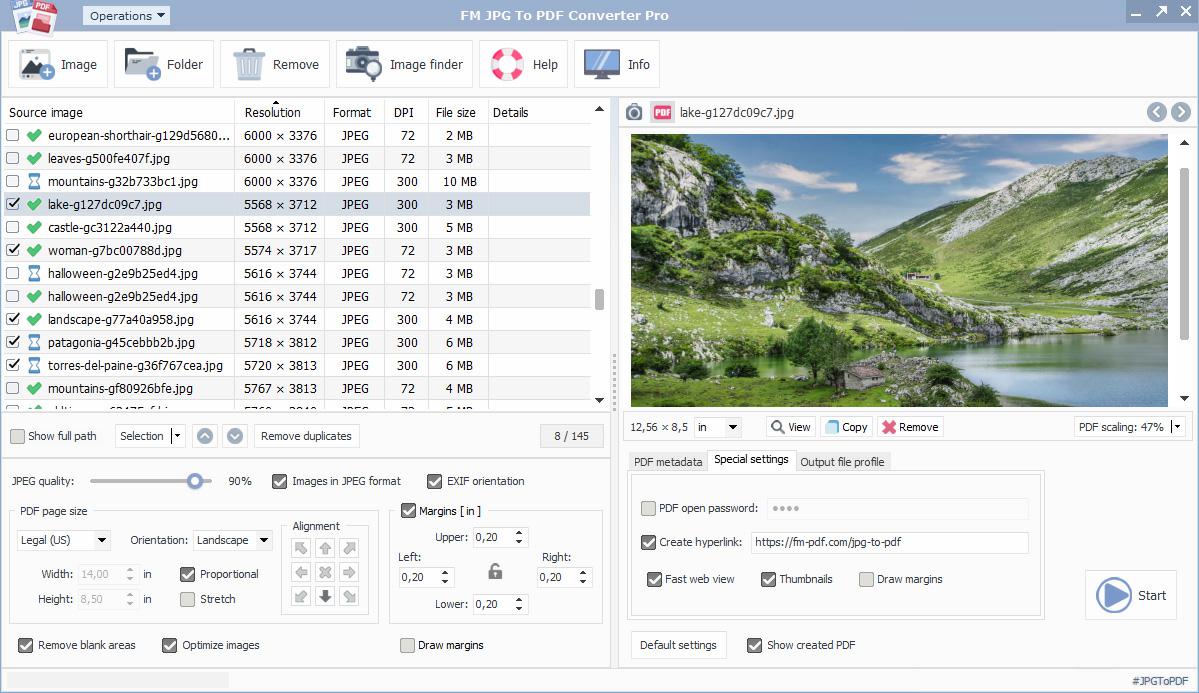
Using this JPG to PDF conversion software helps you convert JPG and other supported image formats, typically grouped according to specific criteria, into PDF files in a single step. You can efficiently create photo albums from images, product presentation documents from infographics, and generate PDF files from graphic image formats using simple settings. Batch processing mode allows you to perform JPG to PDF conversion quickly and efficiently while maintaining appropriate quality and output-specific display settings. In addition to configuring standard PDF properties and metadata, you can also set advanced options such as PDF opening passwords, hyperlinks, fast web view mode, thumbnails, and page margins within the output document.
The integrated image search module also provides free access to a high-resolution, royalty-free stock photo database with millions of available images.
JPG to PDF conversion process
Preparing image files for processing
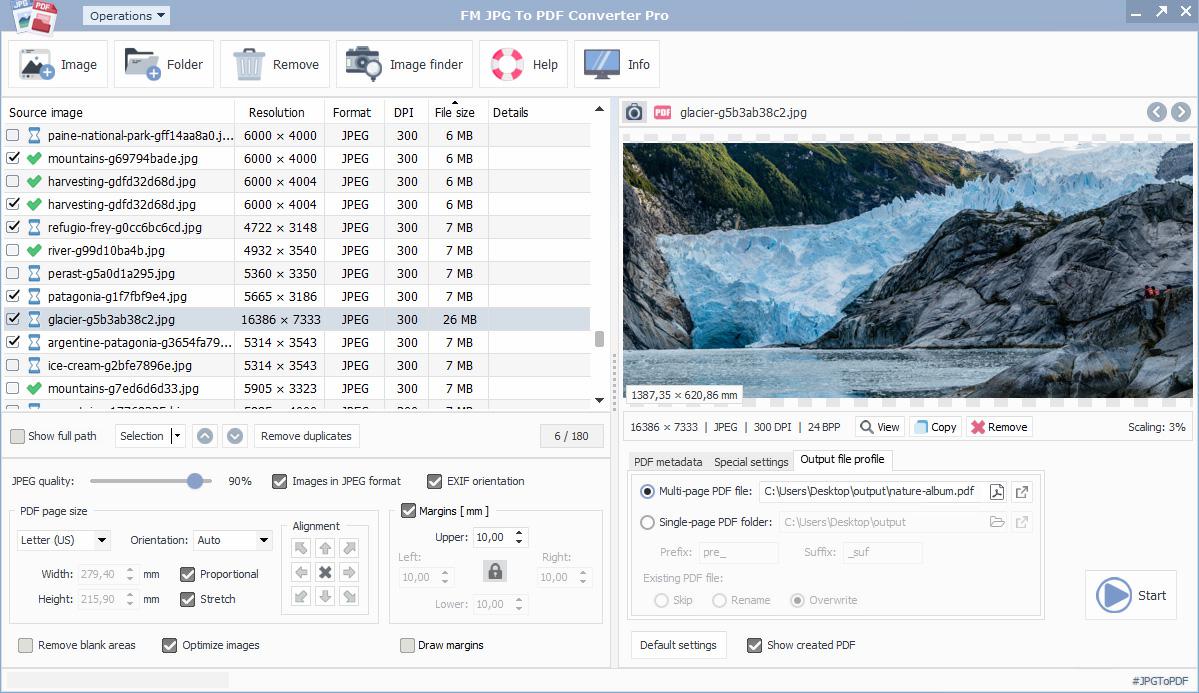
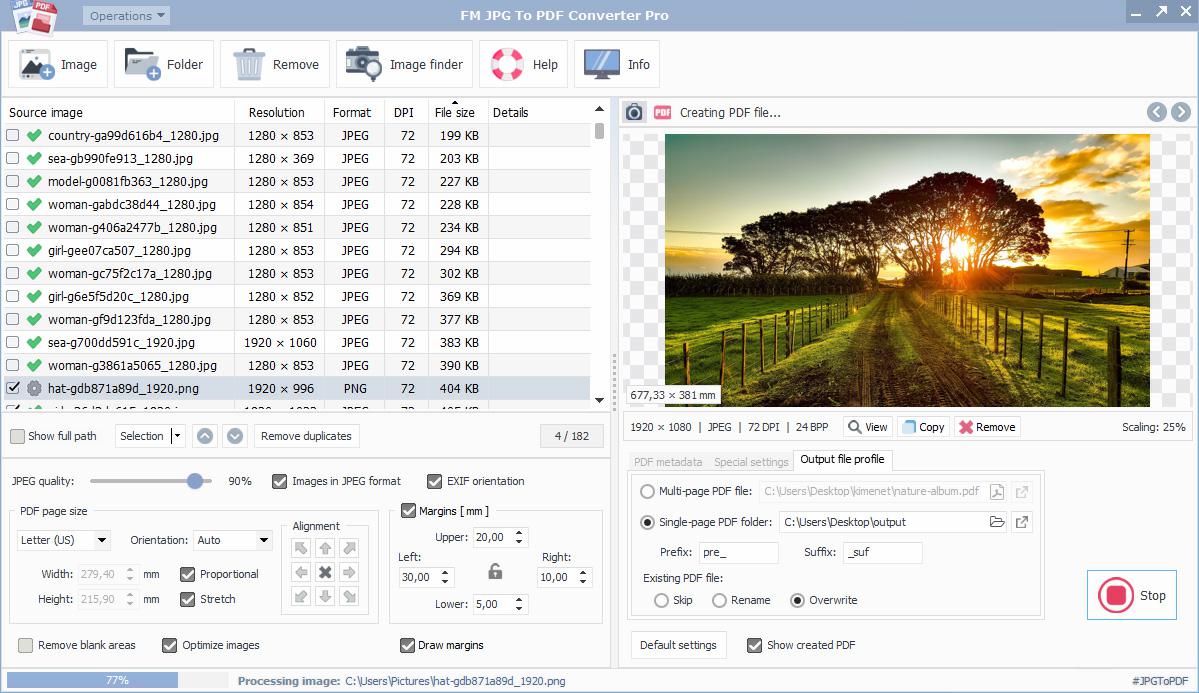
When images are selected in the list, they are displayed in a visual preview panel. Important image or PDF information is shown directly below the preview, including size, resolution, type, color depth, and dimensions calculated from the DPI value. Several editing and management operations are available for input images added to the list, including:
- Add images to the list from different sources
- Preview image in image or PDF view mode
- Open image with an external viewer application
- Copy to clipboard
- Change image order
- Select items for conversion
- Sort by file and metadata values by clicking table headers (resolution, type, DPI, file size)
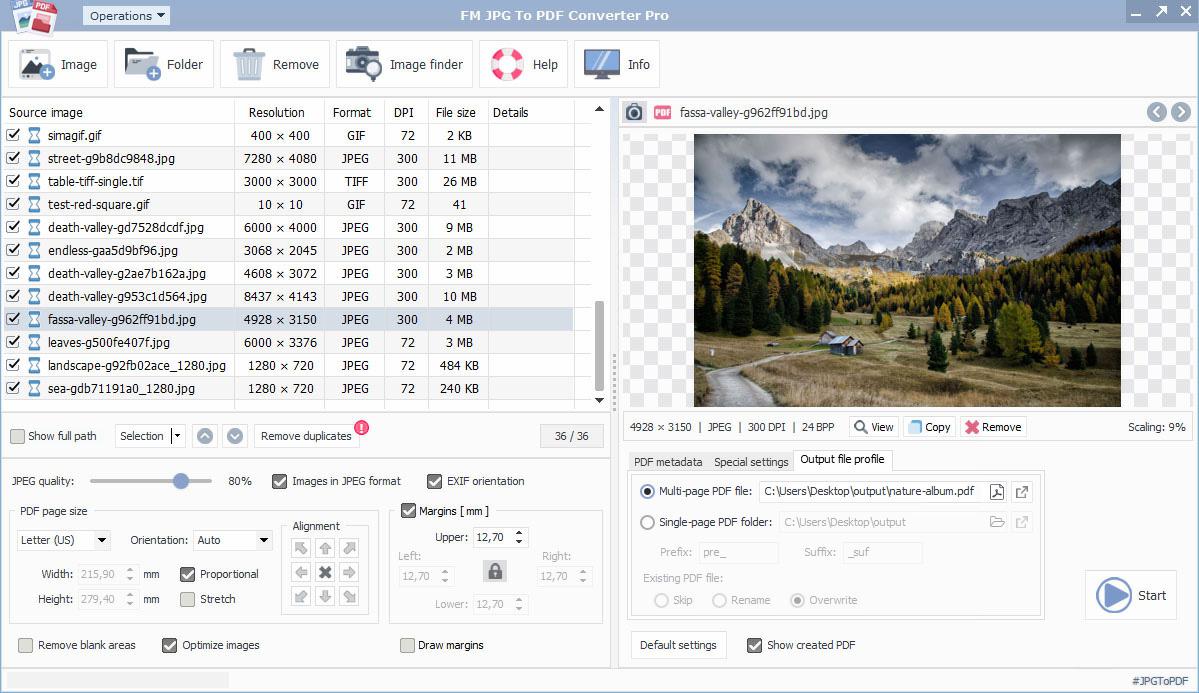
- Remove duplicate images
- Rotate image
During the JPG to PDF conversion process, only the selected images will be converted and embedded into the resulting PDF file. With the appropriate settings, the application can create any number of PDF photo albums or uniformly formatted PDF documents from grouped images, including password-protected PDF files.
Download JPG to PDF conversion software
The FM JPG To PDF Converter Pro application enables you to convert large numbers of JPG/JPEG images, photos, graphics, multi-page TIFF files, or animated GIFs into PDF format in batch processing mode. Images, photos, and graphic files can be placed into a consistently formatted PDF document in a single step, including optional hyperlinks and thumbnails. Images embedded in password-protected PDF files remain available in excellent quality after automatic optimization. Native support for high-resolution royalty-free images through the integrated image search module can further enhance your completed PDF documents.
Batch JPG to PDF Conversion
Source JPG Images
The software allows you to convert images, photos, and graphic files into PDF format within a single session. First, download and install the FM JPG To PDF Converter Pro application.
Output PDF Files
Any number of software-optimized images can be embedded into the output PDF file, which can also be protected with an opening password. Built-in controls help manage the order of images added to the list.
The application is more than a simple JPG to PDF converter capable of converting hundreds of images into PDF files. It also offers numerous convenience and optimization features. JPG To PDF Converter Pro provides image display and real-time PDF rendering within the preview area used for layout adjustments. When creating photo albums, the built-in image search module provides access to a database containing millions of royalty-free stock photos. High-quality photos and illustrations downloaded through the integrated image search module can easily be added to enrich your PDF documents.
PDF display and page settings
During the JPG to PDF conversion process, after selecting the source images, you must define the output PDF page size (width, height) and page orientation (automatic, portrait, landscape). Supported ISO-standard PDF page sizes include A5, A4, A3, A2, A1, Letter (US), and Legal (US). Custom page sizes and dimensions calculated from the input image DPI value are also available.
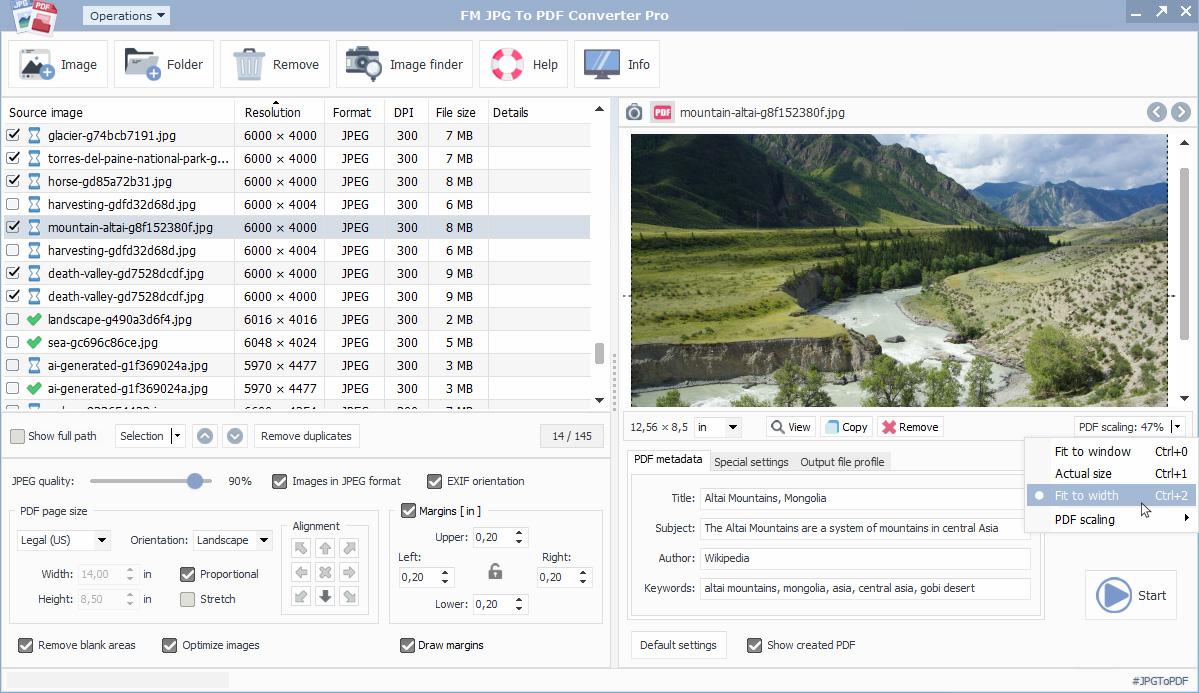
The editing and preview panel always displays the image according to the current layout, whether in image or PDF preview mode. Additional information is available in the lower-left corner of the preview area, where an information panel displays the print size calculated from the DPI value of the selected source image. For image alignment tasks, PDF preview mode is generally recommended for better visualization. Right-clicking within the preview area opens a menu with various viewing and editing options.
PDF view transformation settings
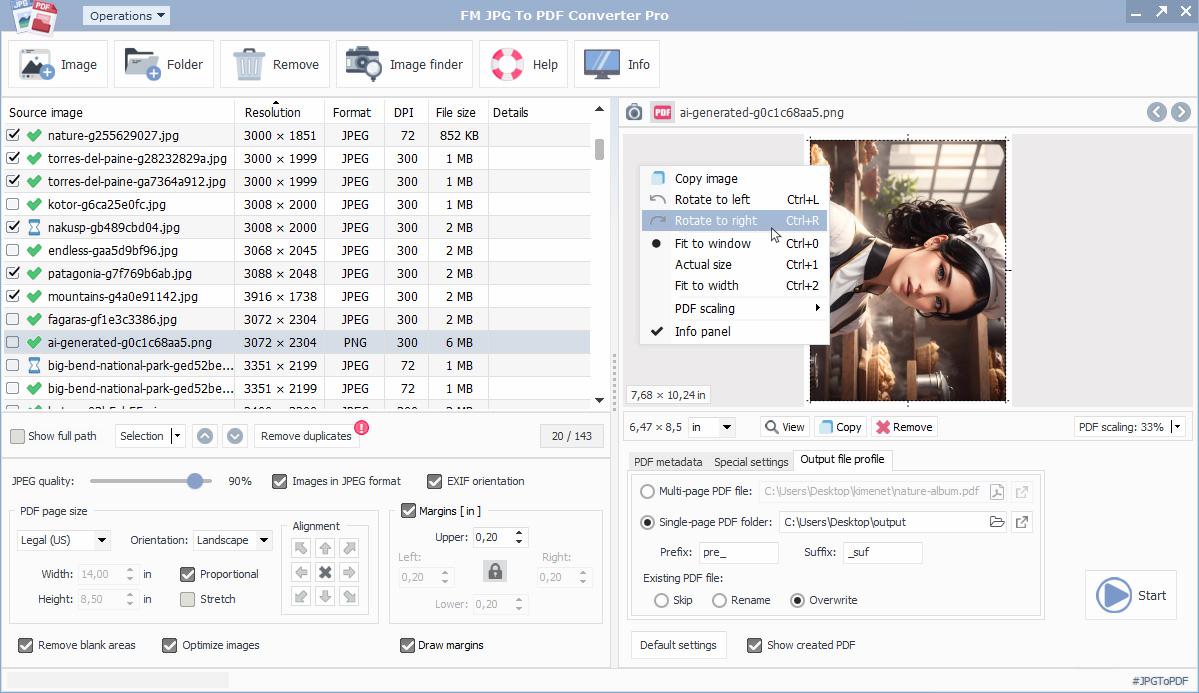
Support for bitmap and special image formats
In addition to raster images (JPG, PNG, GIF, PSD) accessible from the local computer, a special image source option is the direct online download of high-resolution royalty-free images. The software natively supports the following input image formats: BMP, GIF, JPEG/JPG, JPEG-2000, ICO, PNG, PCX, PSD, TGA, TIFF, WebP.
Besides widely used image formats, the application is also prepared to handle special image file types such as multi-page TIFF files and animated GIF files (aGIF87, aGIF89). When converting these formats to PDF, all image frames are embedded into the output file. For animated GIF files, the software automatically plays the rendered animation.
Image optimization in PDF files
By default, the software supports optimizing high-resolution images before embedding them into PDF files. Based on the image's final position and dimensions, the optimal pixel density is calculated, allowing significant file size reduction without quality loss. The advanced settings also include Fast Web View mode, which can be combined with image optimization to create web-ready PDF files with the smallest possible size and the best possible quality.
Image list editing operations
The FM JPG To PDF Converter Pro application helps organize image lists efficiently, since images are inserted into the PDF according to the list order. All move operations apply only to selected images and are performed as grouped actions. In addition to the move up and move down controls below the list, the sorting order can also be changed by clicking the table headers of the image list (name, resolution, format, DPI, file size).
FM JPG To PDF Converter Pro application controls
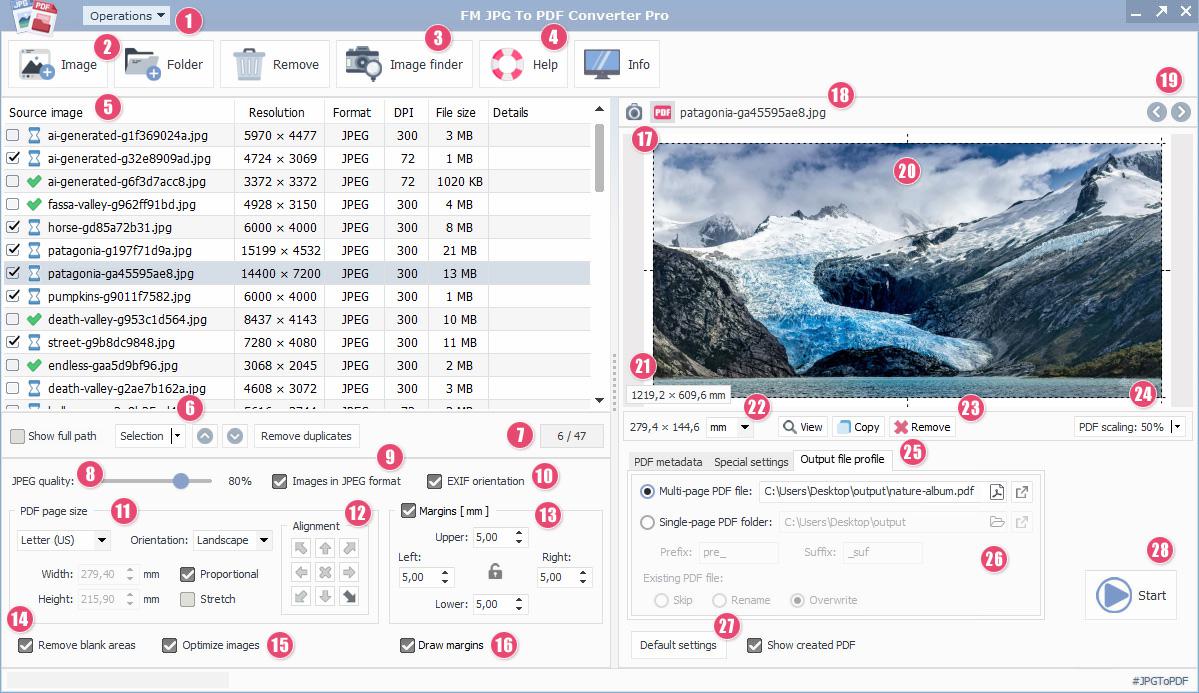
- Main system menu
- Add images to the list
- Integrated image search and download module
- Software online information website
- Image conversion list table
- List item selection submenu
- Selected/all list items
- JPEG image quality control
- Embedded image encoding mode
- JPEG photo EXIF orientation option
- PDF page size selector
- Image alignment and layout
- Margin settings
- Remove blank page areas
- Embedded image optimization
- Draw margins and guide lines
- Preview mode controls
- Current image path
- List item navigation buttons
- Preview panel image area
- Source image information panel
- Unit selector
- Preview function shortcuts
- PDF zoom settings
- PDF metadata and advanced options
- Output file profile settings
- Default application values
- Start/stop operation button
Bitmap image conversion process to PDF format
- Add images from supported image file formats (BMP, GIF, JPEG/JPG, JPEG-2000, ICO, PNG, PCX, PSD, TGA, TIFF, WebP) from a local computer or network drive 2
- Download high-resolution, royalty-free images, illustrations, and graphics (stock photos) using the image search and download module 3
- Organize image items using the controls – selection and ordering 6
- Quality 8 and image orientation settings for JPEG-encoded images and photos
- Select the PDF page size from standard paper formats 11
- Align images within page margins – anchor point alignment, stretching, aspect ratio preservation 12
- Define page margins 13, 16
- Ignore blank areas outside the image 14
- Embedded image optimization – determine the optimal size/quality from the calculated final image dimensions 15
- Information elements available during editing and configuration
- Sorting and selection controls for the preparation process 22-24
- Metadata, special options, and file profile settings for the output PDF 25
- File profile settings for single-page or multi-page PDFs 26
- Start/stop the JPG-to-PDF conversion process 28
- Open the generated PDF file containing the converted images with the default PDF reader 26
Display modes of the preview panel
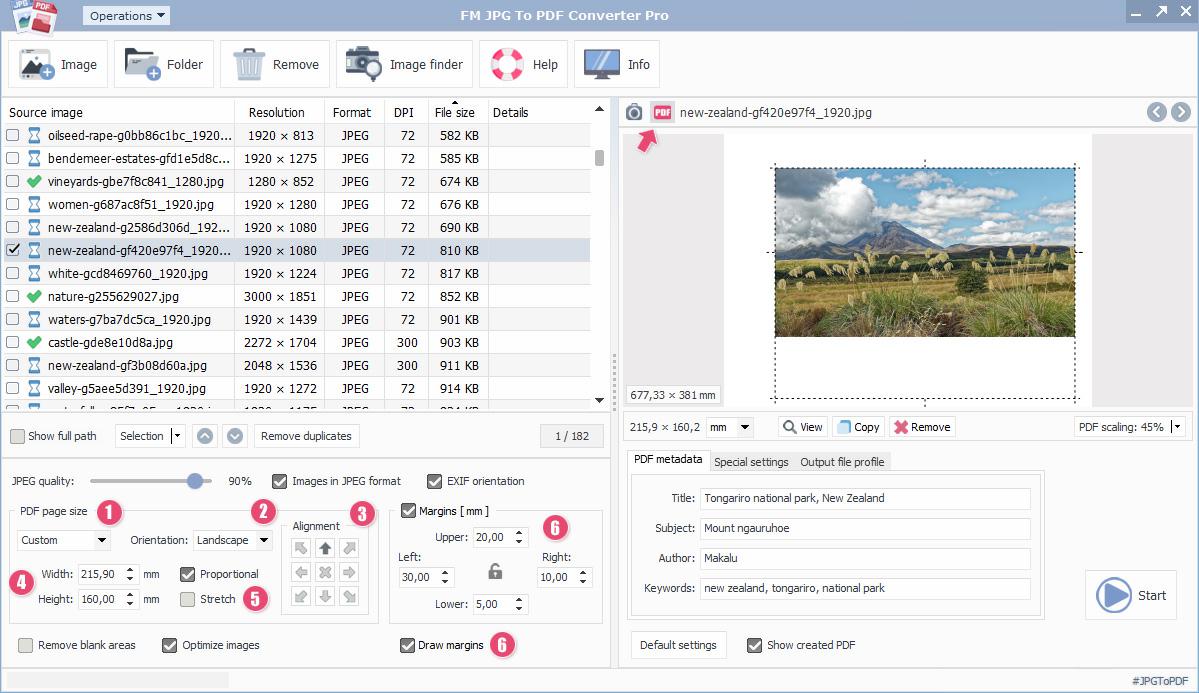
Edited PDF preview mode
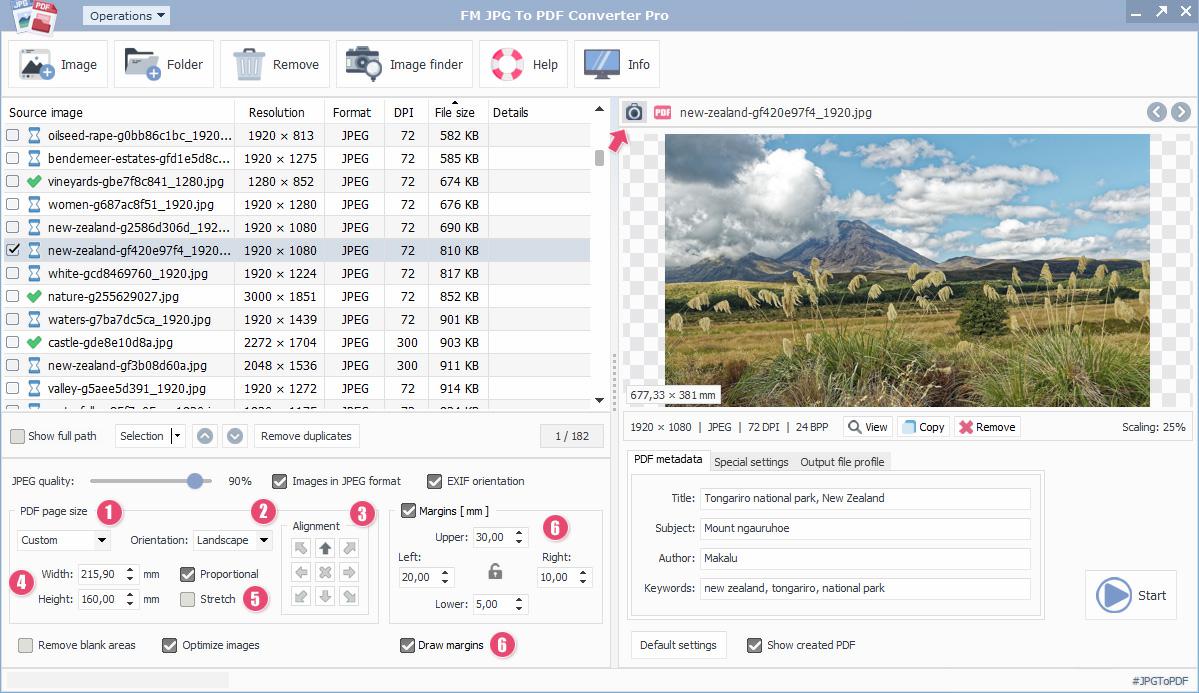
Simple image preview mode
Embedded images on PDF pages
By switching between display views (simple image and PDF mode), the most suitable preview mode can be selected. Since JPG To PDF Converter Pro uses real-time PDF rendering, any changes made are displayed immediately in the preview area.
After setting the output PDF size 1, 4, a uniform image orientation 2 and alignment 3 can be specified according to the applied margin values. When automatic orientation is selected, the image orientation adapts to the PDF page dimensions. Nine main alignment points can be selected 3 using the positioning buttons, with center alignment set as default. By switching the proportional scaling and stretching options 5, the image can be stretched proportionally to fit the margins.
Image alignment on pages
Using margins to define the image position on the page is optional. In this case, the final appearance of the source image is based on the full page area. When margin values greater than zero are specified 6, the area defined by the margins is subtracted from the PDF page size, and the image is aligned within the remaining space. The option to draw margins is also available. In this case, margins and guide lines are drawn on the PDF according to the specified margin settings before the image is rendered. This is primarily intended for preview and positioning purposes.
Screenshot gallery
Integrated image search and download module
With an appropriate software license, the software's image search and download module provides direct access to millions of royalty-free stock photos, illustrations, and graphics. Photos, illustrations, and graphics can be searched by keyword or topic and are available in excellent quality through the search module. The image search module can be activated by clicking the dedicated button on the application interface. After entering a keyword in the search field and selecting the desired filters and language settings, the image search function can be used. Search results are displayed instantly in the preview panel.
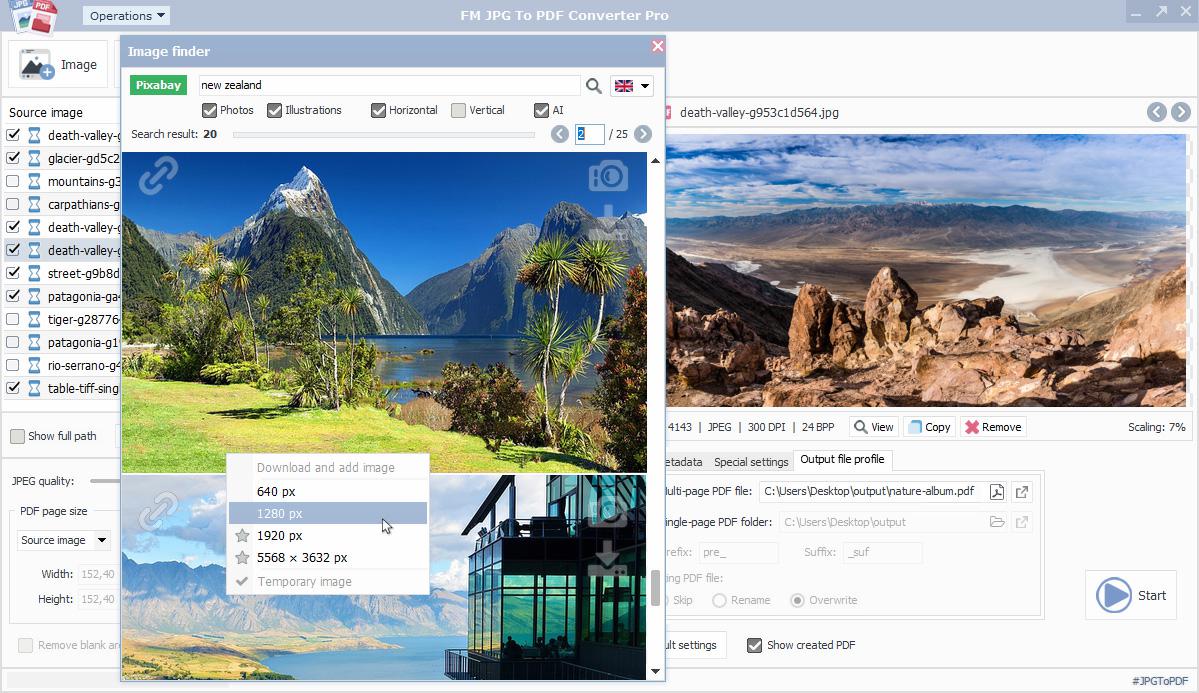
The search results contain image-related information such as the direct link to the source webpage and the image type (photo, illustration, vector graphic). By clicking the download icon, the desired resolution can be selected, and the software downloads the chosen image. The image search module also allows filtering by image type, orientation (horizontal or vertical), and search language.
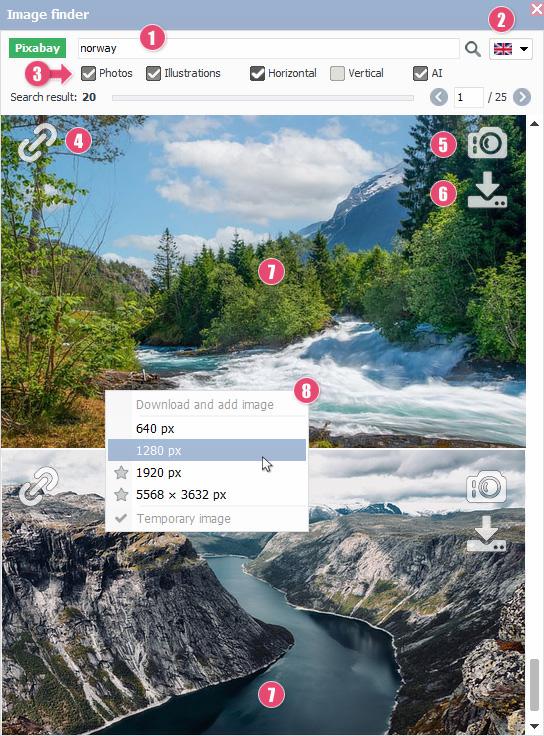
Image search module components
- Search field
- Search language selector
- Image search options – type, orientation, enable/disable AI-generated images
- Result image link to the source website
- Result image type – photo, illustration, vector graphic
- Download result image in different resolutions
- Low-resolution preview of the result image
- Quick download menu
Image download module integration
An active internet connection is required to use the image search and download module integrated into the software. Search queries are performed securely via encrypted HTTPS connections. The application provides integrated access to a database containing millions of free images, clipart graphics, illustrations, and photos through a third-party stock photo service.
The image search module also supports searches in national languages. The desired language can be selected from more than twenty available languages using the selector 2 located in the upper-right corner of the module window. Searches can also be limited to AI-generated images 3. Each results page can display up to twenty images, with navigation buttons available for browsing between pages.
Images downloaded using the module are added to the image list. When selected for conversion, they participate in automatic image optimization and the JPG-to-PDF conversion process in the same way as image files loaded from a local PC. With an appropriate software license, images downloaded through the image search module can also be saved to local storage in JPG or PNG format.
FM JPG To PDF Converter Pro user interface
FM JPG To PDF Converter Pro software features
- Batch JPG to PDF file conversion
- Standard PDF page sizes
- Automatic image optimization
- Single-page and multi-page PDF outputs
- Real-time PDF rendering
- Support for 50MB+ photos
- Photo orientation based on EXIF data
- Integrated image search and download module
- Password-protected PDF
- Multi-page TIFF and animated GIF conversion
- Hyperlinks can be placed on images
- Preview PDF thumbnails
- Fast conversion process
- Multilingual user interface
Download FM JPG To PDF Converter Pro
Download the professional image conversion application for free to convert bitmap images into PDF in a single session. Enhance merged image collections with high-resolution, royalty-free stock photos using the integrated online image search. Advanced image optimization reduces PDF file size while preserving excellent image and content quality.
Software datasheet
- Application name:
- FM JPG To PDF Converter Pro
- Short description:
- Batch mode JPG to PDF Converter. The software can quickly convert large numbers of JPG/JPEG and other raster image types into single-page and multi-page PDF files in batch mode.
- Current version:
- 2.03
- Release date:
- November 16, 2023
- Installer size:
- 16.13 MB
- Languages:
-
English,Deutsch (German),Español (Spanish),Português (Portuguese),Polski (Polish),Magyar (Hungarian),Français (French),Italiano (Italian),Čeština (Czech),Hrvatski (Croatian),Nederlands (Dutch),Dansk (Danish),Svenska (Swedish),Norsk (Norwegian),Suomi (Finnish),Lietuvių (Lithuanian),Български (Bulgarian),Türkçe (Turkish),Русский (Russian),Ελληνικά (Greek),Română (Romanian),简体中文 (Simplified Chinese),한국어 (Korean),ไทย (Thai),हिन्दी (Hindi),Indonesia (Indonesian),日本語 (Japanese),Tiếng Việt (Vietnamese)
- Operating System: Windows 10-11 (32, 64-bit)
- Processor: Intel Core 5 or AMD Ryzen 5, 2+ GHz
- Memory: 4+ GB RAM
- Storage: 30 MB background storage
- Internet connection for checkings, online services and updates
- Version 2.03 - (Released on November 16, 2023)
- Small GUI updates
- Version 2.02 - (Released on October 15, 2023)
- Improving window positioning on multi-display systems
- Version 2.0 - (Released on Sptember 8, 2023)
- The first release was based on the Free JPG To PDF Converter
- High quality and royalty free stock image finder integration
Convert graphic files to PDF format
Using this JPG to PDF conversion software, you can easily create PDF documents from images, photos, and graphic files. The generated PDF file may contain a large number of embedded images that are optimized and adapted to the selected PDF page and margin settings. Images can be aligned freely within the available space on PDF pages. The application supports image orientation settings (automatic, portrait, landscape), as well as image rotation, stretching, and resizing. The output PDF can also include advanced features such as metadata, open password protection, hyperlinks, Fast Web View optimization, and visible preview thumbnails.
With the integrated image search and download module, the application provides unlimited access to millions of free, high-resolution, royalty-free images.
Batch JPG to PDF file conversion
JPG To PDF Converter Pro was primarily developed to convert large numbers of JPG images, photos, and other graphic files into PDF documents in a single operation. In batch mode, it can convert BMP, GIF, JPEG/JPG, JPEG-2000, ICO, PNG, PCX, PSD, TGA, TIFF, and WebP image formats into embedded images within PDF files. Before starting the conversion process, you can monitor setting changes in a visual editing area with image and PDF preview modes. Several control tools help organize and sort graphic files added to the image list, allowing you to set the desired image order. The software also includes multilingual user support.
Questions and answers about the professional JPG to PDF converter software
Summary
FM JPG To PDF Converter Pro is a dedicated JPG to PDF conversion application that supports more than two dozen languages and can convert large numbers of raster image files into a unified PDF output format with consistent settings and properties in batch mode. The application supports common bitmap image formats as input sources (BMP, GIF, JPEG/JPG, JPEG-2000, ICO, PNG, PCX, PSD, TGA, TIFF, WebP), which are embedded and arranged in sequence across the pages of the resulting PDF document after conversion.
The program includes an integrated image search and download service through its built-in module, providing access to millions of high-resolution, high-quality images, graphics, and illustrations (stock photos). In addition to many other features, it enables management of PDF metadata, configuration of PDF password protection, insertion of hyperlinks, and creation of fast single-page and multi-page PDF outputs while operating in batch image conversion mode.